Use the SQL command UPDATE to modify one or more rows in a table and, depending on the configuration of the DSN, in the Vision data file.
Syntax
UPDATE <table-name>
SET <field-name> = <literal>
[,<field-name> = <literal> [, ...]]
[WHERE <condition>]
This command modifies the specified fields in all rows whose old values satisfy the WHERE condition. The format of the WHERE clause is the same as it is in the SELECT command. If there is no WHERE clause, all rows are modified.
If the WHERE condition is included, but no rows satisfy the condition, the command does nothing, and it does not report an error.
Example
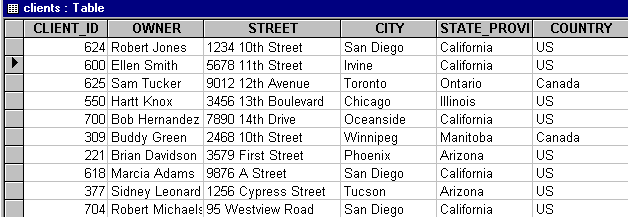
Enter the following command to change Ellen Smith's city and state to Irvine, California:
UPDATE clients
SET city = 'Irvine', state_province = 'California'
WHERE owner = 'Ellen Smith'
The updated table looks similar to this: