


The SELECT command (which is also called a query) allows you to extract rows from a table, according to optional selection rules. Syntax for a SELECT statement can be:
Syntax
SELECT [DISTINCT] <field-list-1>
FROM <table-list>
[WHERE <condition>]
[ORDER BY <field-list-2>]
This section begins by presenting a simple SELECT statement and builds on it to develop more complex queries.
The SELECT and FROM clauses
At its most basic, a SELECT command indicates which fields you want to view in the specified table.
Syntax
SELECT [DISTINCT] <field-list-1>
FROM <table-name>
where
<field-list>
is the list of fields that must be selected, written according to the following syntax:
<field-name-1>[, <field-name-2>] . . .
All the fields in this list must belong to <table-name>.
If you want to select all the fields in a table, replace <field-list-1> with the character "*" (asterisk), which means "all the fields in <table-name>."
<table-name>
is the name of a table containing fields specified in <field-list>.
Example
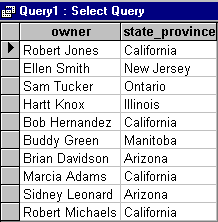
Using the sample data from the "clients" table, enter the following statement to view a list of pet owners and the cities in which they live:
SELECT owner, state_province
FROM clients
For information on queries to more than one table, see section 5.3.2, "JOIN Statements".
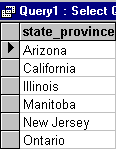
Use the SELECT DISTINCT command to view only one instance of each value in a column. For example, to see which cities are represented in the "clients" table, without any duplicates, enter the following query:
SELECT DISTINCT state_province
FROM clients
The following view is a result of this query. Note that California and Arizona each appear only once.
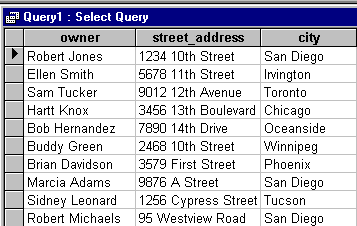
You can use a column alias to give a column a different name in the view you are requesting. For example, the "clients" table contains a column named "street." If you want to call this column "street_address" when you view the results of a query, use the following command:
SELECT owner, street AS street_address, city
FROM clients
The following view is a result of this query:
The WHERE clause
The WHERE clause imposes conditions on the SELECT command, enabling you to focus your query. This section discusses those conditions and provides some examples.
When you include the WHERE clause, the format of the SELECT command becomes:
SELECT [DISTINCT] <field-list-1>
FROM <table-name>
[WHERE <condition>]
where
<condition>
is a logical expression that identifies a useful set of rows from the rows in the table. The logical expression can contain column values, literals, and operators.
<column value>
is the title of one of the columns in <table-name>.
<literal>
is a numeric or alphanumeric (or character) string. If it is alphanumeric, in AcuODBC, it must be enclosed between single quotation marks (' ').
<operator>
is a comparison operator included in the following list:
| Comparison Operator | Meaning |
| = | Equal to |
| > | Greater than |
| < | Less than |
| >= | Greater than or equal to |
| <= | Less than or equal to |
| <> or != | Not equal to |
| LIKE | Matches a pattern |
| BETWEEN | Included between two values |
| IN | Included in a list of values |
| NOT IN | Not included in a list of values |
Example 1 - WHERE clause
Following the earlier example, enter the following statement to view a list of pet owners who live in San Diego:
SELECT owner, state_province
FROM clients
WHERE state_province = 'California'
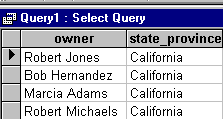
Compare this with the view created using just the SELECT and FROM clauses.
Example 2 - WHERE clause with LIKE condition
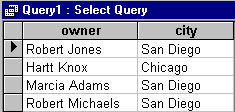
Include the LIKE condition for pattern matching or to view values that contain a specified string. For example, to see a list of owners who live in cities that contain the string "go", enter the following command:
SELECT owner, city
FROM clients
WHERE city like '*go*'
The following view is a result of this query:
Include the BETWEEN condition to find values within a specified range. For example, for a list of owners with a client_id between 600 and 699 (inclusive), enter the following query:
SELECT owner, client_id
FROM clients
WHERE client_id between 600 and 699
The following view is the result of this query:
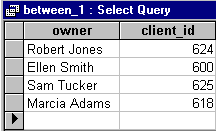
Note that six owners do not appear in this view.
Example 4 - WHERE clause with IN condition
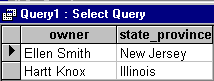
Use the IN condition to view entries that fall within a list of values. For example, for a list of owners who reside in either Illinois or New Jersey, enter the following query:
SELECT owner, state_province
FROM clients
WHERE state_province in ('Illinois', 'New Jersey')
Note that Illinois and New Jersey are each enclosed in single quotation marks because they are alphanumeric literals, and note that the range of possible values is enclosed in parentheses.
The following view is a result of this query:
Example 5 - WHERE clause with NOT IN condition
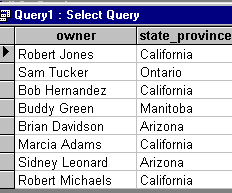
Use the NOT IN condition when you want to view entries that fall outside of a range of values. For example, for a list of owners who do not reside in either Illinois or New Jersey, enter the following query:
SELECT owner, state_province
FROM clients
WHERE state_province not in ('Illinois', 'New Jersey')
The following view is a result of this query:
Example 6 - WHERE condition with logical operators
Conditions can be joined with the logical operators "AND" and "OR." According to normal precedence rules, AND conditions are evaluated before OR conditions. Using parentheses, you can override these rules. Enter the following statement to see the names and address of owners who live in either California or Canada:
SELECT owner, city, state_province, country
FROM  clients
WHERE state_province = 'California' or country = 'Canada'
The following view is the result of this statement:
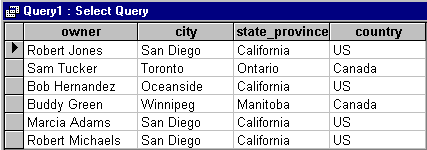
Note that if you do not include the WHERE clause, your query returns data for all the rows in the table.
Functions
AcuODBC supports operations functions for summarizing data in columns (aggregate functions) and across rows. The "accounts" table contains information on patient accounts for six months.
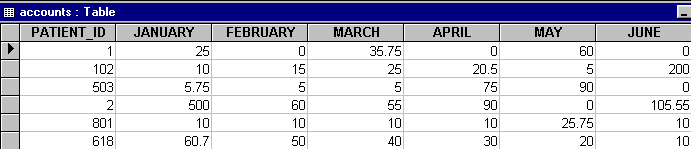
You can determine, for example, either the amount outstanding in a month, or the amount owed on a given patient. This section provides a partial listing of the supported functions and some simple examples. For more details on row and aggregate functions, consult any standard SQL reference.
Standard Aggregate Functions
AcuODBC supports a series of standard SQL aggregate functions that are specified inside a SELECT command on selected fields. The field names to which these functions apply must follow the name of the function and be enclosed in parentheses.
The standard aggregate functions are:
| Function | Description |
| COUNT(*) | Returns the number of rows of a table. |
| COUNT (DISTINCT) | Counts the number of unique values in a column. |
| COUNT(column) | Returns the number of non-null values in the column. |
| SUM | Computes the sum of non-null values in a column. |
| AVG | Computes the arithmetic average of the non-null values in a column. |
| MAX | Returns the highest non-null value in a column. |
| MIN | Returns the lowest non-null value in a column. |
| UPPER | Returns column values in upper case (for conditions only). |
| LOWER | Returns column values in lower case (for conditions only). |
You may want to see the accounts total for a particular month. You can accomplish this by entering a statement containing the SUM aggregate function. For example, enter the following statement to obtain the sum of the January accounts:
SELECT sum(January) AS January_Total
FROM accounts
Your application returns the following:
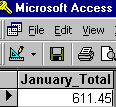
Note that in this case, including the AS clause creates a column with a new name.
Example 2 - COUNT(*) function
The COUNT(*) function returns the number of rows in a table. To see the number of rows in the clients table, enter the following query:
SELECT count(*) as rows
FROM pets
Your application returns the following:

The sample table has only 11 rows. This function is quite useful, however, when tables are larger.
Example 3 - COUNT(column) function
You've just seen that the COUNT(*) function returns the number of rows in a table. Use the COUNT(column) function to see the number of non-null values in the specified column. For example, in the "pets" table, one item in the "treatment" column has no value; it is NULL.
To see the number of non-null values in this column, enter the following command:
SELECT count(treatment) AS non_null_rows
FROM pets
Your application returns the following:
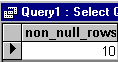
You can see that, in this case, the value returned is smaller than that returned from the COUNT(*) function.
String Functions
AcuODBC supports the following string (or character or alphanumeric) functions inside a SELECT statement. The table below illustrates some commonly used functions with SQL/92 fn syntax, which is the only syntax recognized by AcuODBC directly. See section 5.6, "Functions Supported by AcuODBC", for a complete list.
| Function | Format in AcuODBC | Description |
| CONCAT | {fn CONCAT('string1', 'string2')} | Concatenates two strings together. |
| LCASE | {fn LCASE('string')} | Changes a string to lower case. |
| LENGTH | {fn LENGTH('string')} | Returns the length of a string. |
| LOCATE | {fn LOCATE('character')} | Locates a character in a string. |
| LTRIM | {fn LTRIM('string')} | Removes leading spaces from a string. |
| RTRIM | {fn RTRIM('string')} | Removes trailing spaces from a string. |
| SUBSTRING | {fn SUBSTR('string')} | Locates a string within a string. |
| UCASE | {fn UCASE('string')} | Changes a string to upper case. |
Example
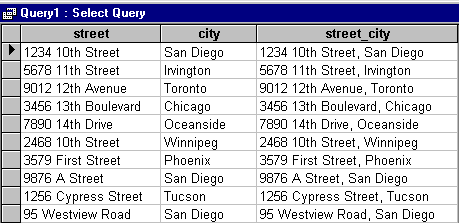
Depending on your application, enter one of the following SQL commands to trim right and left trailing spaces to combine "street" and "city" in a new column called "street_city". Note that the first command is SQL/92 syntax and should work in most applications. The second command is specific to Microsoft Access.
SELECT street, city,
{fn rtrim(street)} + ', ' + {fn ltrim(city)} AS street_city
FROM clients
or
SELECT street, city,
rtrim(street) + ', ' + ltrim(city) AS street_city
FROM clients
Note that the plus sign is used here to combine strings. This example is an alternative to using the CONCAT function.
The following view is a result of this statement:
Arithmetic Expressions
AcuODBC supports the use of arithmetic expressions inside a SELECT command, including the following:
| Function | Example |
| Expressions in the SELECT list | SELECT col1 + col2
FROM table1 |
| Expressions in functions | SELECT max(col1 + col2)
FROM table1 |
| Expressions as part of a BETWEEN predicate | SELECT col1, col2
FROM table1 WHERE col1 BETWEEN col2 + 5 and col2 + 10 |
| Expressions as part of comparisons | SELECT col1, col2
FROM table1 WHERE col1 + col2 > 10 |
| Expressions as the test in an IN clause | SELECT col1
FROM table1 WHERE col1 + col2 IN (10, 20, 30, 40) |
Using an arithmetic expression, you can add the contents of each cell in a row to determine the total charges for a patient in these months:
SELECT patient_id, January, February, March, April, May, June,
(january+february+march+april+may+june) AS Patient_Total
FROM accounts
The following view, including a new column with each patient's total for six months, is a result of this query:
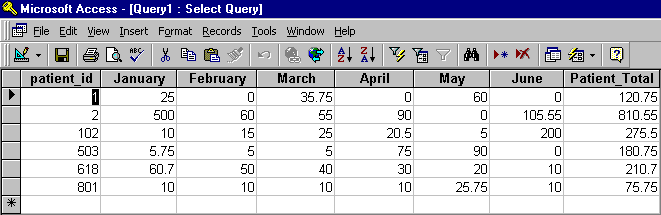
Note that because the statement did not contain the WHERE clause, AcuODBC returned data for every row in the table. However, you can include the WHERE clause when using expressions as well. For example, enter the following query to see the data and totals for patients with a patient_id greater than 100:
SELECT patient_id, January, February, March, April, May, June,
(january+february+march+april+may+june) AS Patient_Total
FROM accounts
WHERE patient_id > 100
The following view is a result of this statement:

The ORDER BY clause
Include the ORDER BY clause to return rows in a specific order in response to your query. Including both the WHERE and ORDER BY clauses, the syntax of the SELECT command is now:
SELECT [DISTINCT] <field-list-1>
FROM <table-name>
[WHERE <condition>]
[ORDER BY <field-list-2>]
where
<field-list-2>
is a field or list of fields contained in <table-name>. For example, to see the list of California pet owners ordered by city, enter the following query:
SELECT *
FROM clients
WHERE state_province = 'California'
ORDER BY city
Your application returns the following view:

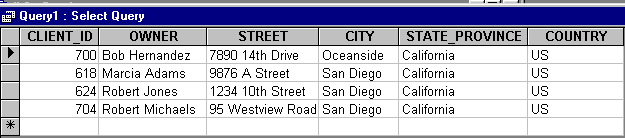
Use multiple entries in the <field-list> to refine the sort order. For example, enter the following statement to see the list of owners ordered by city, and then ordered by "client_id" because three owners live in San Diego.
SELECT *
FROM clients
WHERE state_province = 'California'
ORDER BY city, client_id
The following view is the result of this statement:
The GROUP BY clause
AcuODBC supports the SQL GROUP BY clause.
For example, to see how many times each animal type is represented among the patients, enter the following query:
SELECT animal_type, count(animal_type) AS number_of_patients
FROM pets
GROUP BY animal_type
Your application returns the following view:
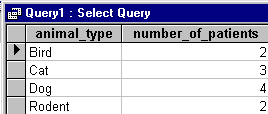
Here you can see that this roster of patients lists two birds and two rodents, four dogs, and three cats.
For detailed instructions on the SELECT statement and its clauses, refer to an ODBC or SQL reference manual, such as the ODBC Programmer's Reference.