JOIN statements represent a special instance of the SELECT statement. They enable you to view data from multiple tables, by combining the tables along a common field.
AcuODBC supports a variety of JOIN statements, including the natural joins, inner joins (the default if no join type is specified), left (outer) joins, and right (outer) joins (by reversing a left join). Note that the word "outer" is optional and is provided for clarity; it has no effect on the join.
Inner joins
Inner joins include only those rows where matches are found. The syntax for an inner join is:
SELECT <field-1>[, <field-2> . . .]
FROM <table-name-1>
[INNER] JOIN <table-name-2>
ON [<table-name-1>.]<field-name-1> = [<table-name-2>.]<field-name-2>
(Note that the word "inner" is optional; it is provided here for clarity.)
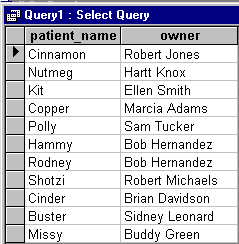
For example, if you want a listing of pets and their owners, you can join the "pets" and "owners" tables as shown in the following command:
SELECT patient_name, owner
FROM pets
INNER JOIN clients
ON pets.owner_id = clients.client_id
Your application returns the following view:
You can join more than two tables. For example, to see a listing of pets, the treatments they received, and their owners, enter the following command:
SELECT patient_name, explanation, owner
FROM (pets INNER JOIN codes
ON pets.treatment = codes.treatment)
INNER JOIN clients
ON pets.owner_id = clients.client_id
Your application returns the following view
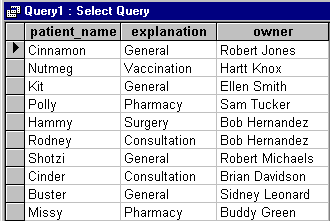
Note that Copper is not included in this view, because the "pets" table does not list a treatment for her.
Left joins
Left joins include all rows from table-name-1, matched or not, plus the columns from matching rows of table-name-2. The syntax for left joins is:
SELECT * FROM <table-name-1> LEFT JOIN <table-name-2>
ON <field-name-1>=<field-name-2>
For example, you can perform a left join on the tables "pets" and "codes" to see a listing of pets and the treatments they received:
SELECT patient_name, explanation
FROM pets
LEFT JOIN codes
ON pets.treatment = codes.treatment
ORDER BY patient_name
The following view is a result of this command. Here you can see that Copper's treatment does not match any of the explanations in the "codes" table.

Right joins
To perform the equivalent of a right join, simply reverse the order of the tables in the query. Reverse the order of the tables in the previous query to form this new join statement:
SELECT patient_name, explanation
FROM codes
LEFT JOIN pets
ON codes.treatment = pets.treatment
ORDER BY patient_name
The following view is a result of this command. Here you can see that none of the patients has had any lab work. In addition, Copper is not listed among the patients because her treatment didn't match any of the treatment codes.

Self joins
You can also self-join a table, essentially putting two copies of the table side by side. To do this, your select-expression lists the table twice in the FROM clause. You cannot use the same table name twice, so you must assign it a different alias each time. This is similar to the column alias introduced in the earlier discussion of the SELECT statement. Use the aliases to refer to the table in the SELECT and WHERE clauses as if there were two tables.
The syntax for this type of select-expression is:
SELECT <alias1.field-name> [, <alias2.fieldname>] [, ...]]
FROM [<table-name> <alias1>] [, <table-name> <alias2>] [, ...]]
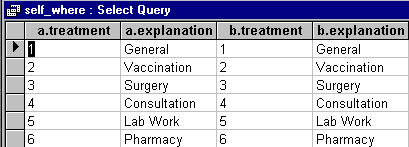
As in other SELECT statements, you can narrow the focus of the query by including a WHERE clause, as in the following example:
SELECT a.treatment, a.explanation, b.treatment, b.explanation
FROM codes a, codes b
WHERE a.treatment = b.treatment
The following view is a result of this query: