Use the SQL command INSERT to add one or more rows to an existing table, and, depending on the configuration of the DSN, to insert records into your Vision data files.
Syntax
INSERT INTO <table-name> [(<field-list>)]
VALUES (<values-list>)
where
<table-name>
is the name of the table into which you want to insert rows.
<field-list>
is an optional list of fields to which you want to assign values. This list must be written according to the following syntax:
<field-name> [,<field-name>] ...
Omitting this list specifies all the fields of the table, using the same order as they are defined.
<values-list>
is a list of literals. The values of these literals are assigned to the fields specified in <field-list>, according to the order in which they are listed. For this reason, the number of elements of both the lists must be equal. At the same time, value of the literal must be compliant with the type of field (alphabetic, numeric, etc.).
<values-list> has the following format:
<literal> [,<literal>] ...
Example
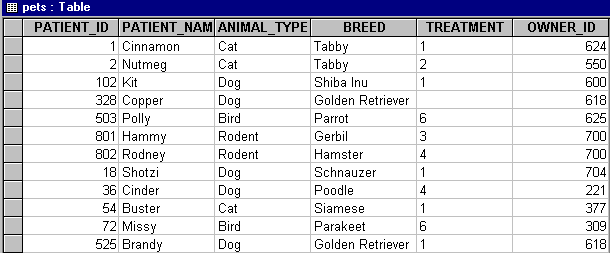
Enter the following command to add a patient to the "pets" table:
INSERT INTO pets (Patient_ID, Patient_name, Animal_type, Breed, Treatment, Owner_ID)
VALUES ('525', 'Brandy', 'Dog', 'Golden Retriever', '1', '618')
The table now has an additional row.