


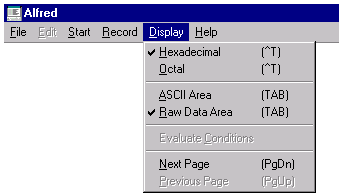
Hexadecimal causes the left portion of the screen (binary area) to be displayed in hexadecimal. This option is valid only when you are editing without an XFD.
Octal causes the left portion of the screen (binary area) to be displayed in octal. This option is valid only when you are editing without an XFD.
ASCII Area moves the cursor to the right portion of the screen. This option is valid only when you are editing without an XFD.
Raw Data Area moves the cursor to the left portion of the screen. This option is valid only when you are editing without an XFD.
Evaluate Conditions causes the display of data associated with a WHEN directive to be updated to match a new controlling value. Choose this option after you change a field that is the controlling value for a WHEN directive. See User's Guide section 5.3 for more information about directives.
Next Page displays the next screen of data.

Previous Page displays the previous screen of data.
