


The ACUCOBOL-GT compiler is capable of generating data dictionaries that store a map of COBOL record structures. These dictionaries are also called extended file descriptors (XFDs) because they're based on the standard COBOL file descriptors (FDs).
XFDs are used by Acu4GL to interface to database management systems. They are also used by alfred, Acucorp's record editor, and by AcuODBC, Acucorp's Vision ODBC driver. In addition, they are used to help guide the mapping of international character sets between machines that use different underlying character codes.
The compiler creates an XFD for each indexed file in the compiled program when you specify the "-Fx" compile-time option. The "-Fxa" option generates XFD files for all indexed, relative, and sequential files in the compiled program. XFDs are fully portable, and thus no recompilation is necessary if you change hardware.

The effects of all compile-time options, COPY REPLACING, and source-code control lines are reflected correctly in the XFDs.
Understanding how the XFD file is formed
Acucorp data dictionaries (XFDs) enable the Acu4GL interface to create a table (or access an existing one) in a database for each indexed file. Each column in the table contains the values for one field. The column names are essentially the field names.
XFDs also allow the alfred record editor to display and accept data in an indexed file at the field level, instead of character-by-character. If an XFD is available to alfred, it has enough information to display fields on the screen, instead of just groups of characters. This makes the screen easier to read, and helps make editing more efficient.
Each XFD file is based on the largest record in the COBOL file, and contains the fields from that record, plus any key fields (key fields are those which are named in KEY IS phrases of SELECT verbs in the File Control section). This ensures that data from all COBOL records will fit within database tables, and simplifies the storage and retrieval process. If you were to examine the XFD file, only the fields from the largest record, and the key fields, would appear.
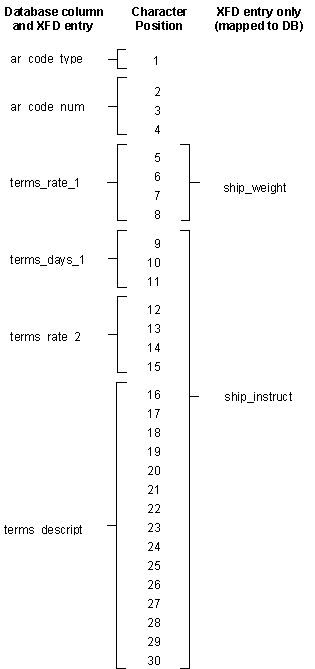
For example, if your program has one file with the three records shown below, the underlined fields will be included as fields in the XFD file by default (this example assumes that ar-codes-key is named in a KEY IS phrase). Some fields will not appear by name in the file, but will be mapped to the "master" field names. The interface thus will eliminate redundancies and give you optimum performance.
01  ar-codes-record.
  03  ar-codes-key.
    05  ar-code-type      pic x.
    05  ar-code-num       pic 999.
01  ship-code-record.
  03  filler              pic x(4).
  03  ship-weight         pic s999v9.
  03  ship-instruct       pic x(15).
01  terms-code-record.
  03  filler              pic x(4).
  03  terms-rate-1        pic s9v999.
  03  terms-days-1        pic 9(3).
  03  terms-rate-2        pic s9v999.
  03  terms-descript      pic x(15).
The following diagram shows how Acu4GL creates database columns for some of the fields in the COBOL record, while other fields are mapped to those columns by the data dictionary; this means that all the fields are accessible to the COBOL program.
The next section describes the rules that the interface follows as it builds the XFD file, and explains how you can override those rules when necessary.
More: