


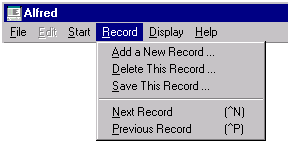
Add a New Record prompts for a key value and allows you to enter a new record.
Delete This Record deletes the current record. A dialog box is displayed to confirm the delete action.
Save this Record saves the current record.
Next Record retrieves the next record. You can also display the next record by clicking on the Next Record button on the toolbar:

or by holding down the "Control" key and typing the letter "n".
Previous Record retrieves the previous record. You can also display the previous record by clicking on the Previous Record button on the toolbar:

or by holding down the "Control" key and typing the letter "p".