


Proper ownerships and permissions on the acurcl executable file, server configuration files, server access files, and existing data files and directories are essential to establishing a secure and functional thin client system.
Setting ownerships and permissions requires root privileges on UNIX systems or Administrator privileges on Windows systems. In UNIX, use the commands chown, chgrp, and chmod to set ownerships and permissions. Please refer to your Windows documentation for the appropriate commands.
Note that in Windows, the "AcuAccess" and "AcuAccess.vix" files should be readable and writable by "Administrator" and "System," with no other access.
UNIX settings
UNIX permission modes are specified by a series of three octal numbers. These three numbers assign access privileges to user, group, and other, respectively.
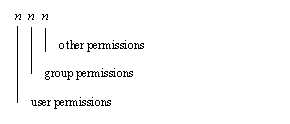
In each user, group, and other field, a value of 7 gives read, write, and execute permissions; a value of 6 gives read and write permissions, a value of 5 gives read and execute permissions, and a value of 4 gives read only permissions.
The UNIX command "ls -l" will return the permissions, ownerships, file size, and modification date of a file or directory. For example:
ls -l /usr2/bsmith/fio_seq
returns:
-rw-r--r-- 1 bsmith general 4870 Aug 18 1993 /usr2/bsmith/fio_seq
For details regarding UNIX file permission masks and the use of chown, chgrp, and chmod, see your UNIX operating system manuals.
More:
UNIX ownerships and permissions on AcuLaunch files