


Because SQL is designed to work with relational databases, you should understand the way relational databases organize data before attempting to write an ODBC program.
Even though, using AcuODBC, you are gaining access to an indexed or relative file system, you will have to write SQL queries referring to "tables" and "columns." AcuODBC uses a data dictionary to convert COBOL data files into database tables that can be accessed with SQL statements. (Refer to section 6.1, "Data Dictionaries", for more information.)
In general, where COBOL manages data using files, databases manage data using tables. A table is composed of rows and columns. In the simplest case, each elementary data item in the record layout for a Vision file corresponds to one column in an SQL table. For example, a file with the following record layout:
01  QA-RECORD.
    05  CLIENT_ID         PIC 9(5).
    05  OWNER             PIC X(30).
    05  STREET            PIC X(30).
    05  CITY              PIC X(30).
    05  STATE_PROVINCE    PIC X(30).
    05  COUNTRY           PIC X(30).
would be interpreted as the following table by AcuODBC if the file contained this data.
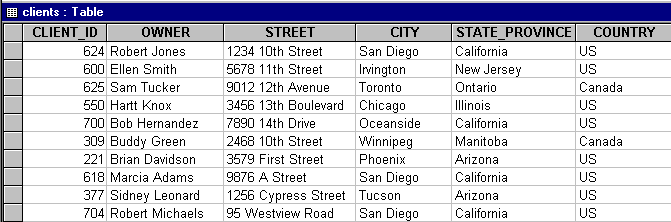
Each COBOL record can be viewed as a row of a table. In this example, each row contains a complete set of information regarding a single client. Columns specify the type of information we have gathered for each client.
However, COBOL records can define certain data types that database tables cannot. For example, COBOL can redefine records or fields, and define arrays with the OCCURS clause. This representation of data is not supported by relational databases and therefore is not supported by SQL. COBOL permits records of different sizes or kinds in a single file; SQL does not.
In addition, COBOL programs can redefine records so that two different database columns actually occupy the same record location in the COBOL data file. Attempting to modify such columns is not valid, and results in an error.
Another difference is that Vision and relative records don't have any type-checking. Just because a field is defined by the database as numeric is no guarantee that there is actually numeric data in that field in every row. This may cause problems for some applications that try to display or update data that is invalid for a particular column.
Even if you use some of the above-mentioned COBOL features that are not supported by the SQL table structure in your files, you may be able to access the file through AcuODBC by including special comments, known as directives, in your FD.