


A file alias provides a way to map data files, XFD files, and SQL tables. File aliases are useful when
A DSN can support a maximum of 64 aliases.
This section describes the fields on the File Alias tab and also provides an example.
Table Name
The table name you enter here is the name of one of the tables in the data source that your ODBC-enabled application opens, as shown in the Microsoft Access example below.
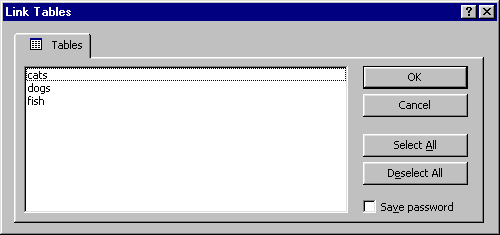
Table names must be unique. You cannot add an alias to the list if you use a duplicate table name.
XFD
Enter the name of the ".xfd" file to be used with the table specified in the Table Name field. Enter only the file name, with neither the path leading to the file nor the extension. AcuODBC takes the path from the XFD Directory field on the General tab.
Data File
Enter the full path (including filename) where the file containing the data for the specified table is located. The data file need not be in the same directory as the ".xfd" file.
Write Permission
This is available only for read/write versions of AcuODBC. Indicate write permissions for the specified tables. You can specify "DSN Default," "Read Only," or "Read/Write". "DSN Default" tells AcuODBC to use the permission established in the Read Only field on the Advanced tab. Selecting "Read Only" or "Read/Write" overrides the setting on the Advanced tab.
Example
Your COBOL program has one description section that references three data files: "file1", "file2", and "file3". Because there is only one description section in your COBOL file, you will get an ".xfd" file for only one of these three data files. Your ODBC-enabled application needs to see these three data files as three tables (called "cats," "dogs," and "fish," respectively) in a database. The code in your program looks like this.
.
.
.
 FILE-CONTROL.
     SELECT work-file
        ASSIGN TO pet-file
        ORGANIZATION IS INDEXED
        ACCESS IS DYNAMIC
        RECORD KEY IS type-id
        FILE STATUS IS qa-file-status.
 DATA DIVISION.
 FILE SECTION.
$XFD FILE=pets
 FD  work-file.
 01  pet-record.
     05  type-id.
         10 atype             pic x.
         10 ano               pic 99.
     05  owner                pic x(30).
     05  breed                pic x(25).
     05  sex                  pic x.
     05  neutered             pic x.
 WORKING-STORAGE SECTION.
 01  pet-file                 pic x(10).
 01  qa-file-status           pic xx.
.
.
.
Note the use of the FILE directive in the code. You must include a FILE directive as a starting name from which to form the name of the data dictionary file. (In this example, since there is no value in pet-file at compile time, the compiler could not tell what name to assign to the data dictionary.) See section 6.3.7, "FILE Directive" for more information on this and other directives.
If the "Read Only" DSN permission is set to "Yes" on the Advanced tab (the check box is selected) and you want to be able to edit the "cats" table, the File Alias tab for your DSN called "family_pets" should look like this to