


The AcuODBC HIDDEN directive allows you to hide specific data items from end users, while providing normal access to other data items. When placed immediately before a data item in an FD, this directive "hides" the item from end users. The HIDDEN attribute applies only to the elementary data item it precedes. Subsequent data items revert to normal read access. Note that you cannot apply the HIDDEN directive to group items and you cannot hide the key.
Syntax
$XFD COMMENT ACUODBC HIDDEN
or
*(( XFD COMMENT ACUODBC HIDDEN ))
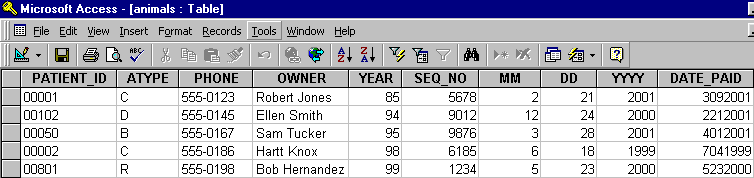
In the following FD, "fee" is hidden from users in the resulting table.
       FILE SECTION.
       FD  qa-file.
       01  qa-record.
           03  animal-info.
               05  patient-id                  pic x(5).
               05  atype                       pic x.
               05  ctype redefines atype       pic x.
               05  dtype redefines atype       pic x.
               05  otype redefines atype       pic x.
           03  owner-info.
               05  phone                       pic x(8).
               05  owner                       pic x(30).
           03  financial.
               05  acct_no.
                   10  year                    pic x(2).
                   10  seq_no                  pic x(4).
               05  last_visit.
                   10  mm                      pic 9(2).
                   10  dd                      pic 9(2).
                   10  yyyy                    pic 9(4).
      $XFD COMMENT ACUODBC HIDDEN
               05  fee                         pic s9(5)v99.
               05  date_paid                   pic 9(8).
Note that in the resulting table, the "fee" column no longer appears:
This directive is useful for hiding data like passwords, telephone numbers, and financial information -- whatever information you do not want users to see.
You cannot include a HIDDEN field in a WHEN directive with a TABLENAME clause. This is due to the complexities of editing or adding records. With a hidden field, you must add the data, but since the field is hidden, you cannot see it and you might add a value that would cause unexpected results. See section 6.3.11 for additional information.
If you add the HIDDEN directive to the FD, you should use the xfdcrypt utility included with AcuODBC to encrypt your XFDs. Otherwise, users could remove this directive to gain access to privileged fields. See section 6.4, "Encrypting XFD Files", for more information.