


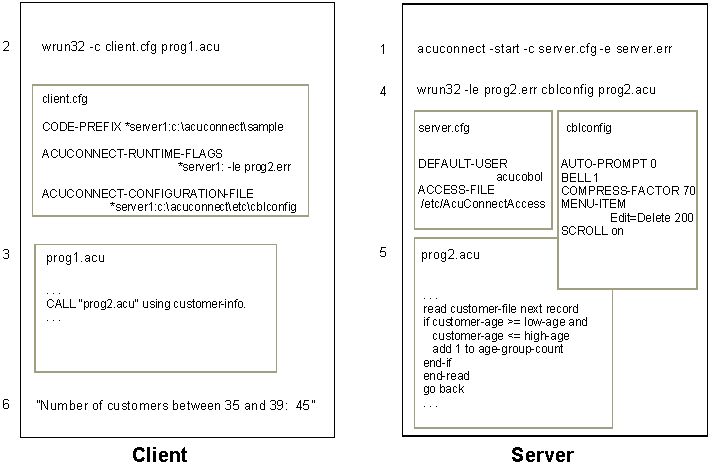
The AcuConnect process can be described as follows:
1. A network administrator starts the AcuConnect daemon on the server. In Windows NT and Windows 2000, this can be accomplished through an application service. In UNIX, the administrator uses the "acuconnect" command A.1 The "acuconnect" Command along with options. For instance, he or she may type:
acuconnect -start -c server.cfg -e server.err
2. The user starts the ACUCOBOL-GT client application on the client. In Windows, he or she clicks an icon. In UNIX, he or she types a "runcbl" command. For instance:
runcbl -c client.cfg prog1.acu
3. The client application, "prog1.acu" in this example, performs a remote CALL to the server application. For instance:
CALL "prog2.acu" using customer-info.
4. AcuConnect automatically starts the remote application, "prog2.acu", on the server using the runtime flags and configuration file specified in "client.cfg".
5. The remote application performs the requested task and returns a response to the client. If programmed accordingly, the remote application may perform a CALL to another application on the same or different server before sending back a response.
6. The client program processes the result, possibly displaying it to the user.
The AcuConnect process flow is illustrated in the following diagram.
Synchronous or Asynchronous Operation
In the example shown above, the client application waits in a suspended state until the remote application performs its task and returns a result (i.e., a "synchronous" CALL was performed). If desired, you can allow the client application to continue running by CALLing a new library routine, C$ASYNCRUN, along with the remote application. In this case, you specify the "handle" of the remote application, as well as the application name itself. For instance:
CALL "C$ASYNCRUN" using handle-of-prog2 "prog2.acu" customer-info.
C$ASYNCRUN tells AcuConnect to allow asynchronous processing. If you use C$ASYNCRUN, then you can check the status of the server application using the companion routine, C$ASYNCPOLL.