


If you've chosen a key, but are not using an XFD file, alfred needs information about how to accept and display the key. This information is referred to as the keymap for the key. A keymap is a series of As, Ds, Os, and Xs, one character for each byte in the key.
Each character in the keymap describes the type of data alfred should find at the corresponding character position.
A An "A" indicates alphanumeric data.
D A "D" indicates binary data that should be accepted and displayed in decimal format.
O An "O" indicates binary data that should be accepted and displayed in octal format.
X An "X" indicates binary data that should be accepted and displayed in hexadecimal format.
A series of characters can be represented with count notation, like COBOL picture clauses. For example, a keymap of "AAAAA" is equivalent to "A(5)".
alfred prompts for keymap information by displaying the following input screen:
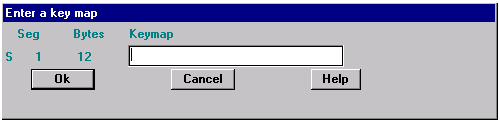
You need to enter a keymap for each segment of the key. Each keymap must have non-space characters equal to the number of bytes indicated under "Bytes". Incomplete keymaps are indicated by an 'S' in column 1. Keymaps with invalid characters are indicated by a 'C' in column 1.
Here's an example:
Suppose the first segment of the key is a PIC 9(5) field, and the second segment is composed of two fields, a PIC X(15) and a PIC 9(8)V99 COMP-6.
You could enter the following keymap:
A(5) for the first segment, and
A(15) X(5) for the second segment
Sometimes segments of a key are composed of different types of data, even though they are known to the file to be contiguous. For clarity, spaces are therefore allowed in keymap descriptions; the spaces themselves do not have value, but are just indicators that the actual segment is to be viewed as multiple logical segments.
If the keymap entered is not valid, a character is displayed in column one of the segment line. The character "S" indicates that the keymap is incomplete. The character "C" indicates that the keymap contains an invalid character.
It is possible to enter more characters for a keymap than the segment contains, so all keymap entries are checked for size as well as type.