


Proper ownerships and permissions on the acuserve executable file, server configuration files, server access files, and existing data files and directories are essential to establishing a secure and functional AcuServer system.
Setting ownerships and permissions requires root privileges on UNIX systems. Use the commands chown, chgrp, and chmod to set ownerships and permissions.
UNIX settings
UNIX permission modes are specified by a series of three octal numbers. These three numbers assign access privileges to user, group and other, respectively.
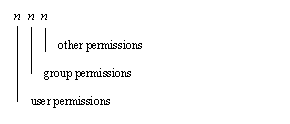
In each user, group and other field, a value of 7 gives read, write and execute permissions; a value of 6 gives read and write permissions, a value of 5 gives read and execute permissions, and a value of 4 gives read only permissions.
The UNIX command "ls -l" will return the permissions, ownerships, file size and modification date of a file or directory.
For example:
ls -l /usr2/bsmith/fio_seq
returns:
-rw-r--r-- 1 bsmith general 4870 Aug 18 1993 /usr2/bsmith/fio_seq
For details regarding UNIX file permission masks and the use of chown, chgrp, and chmod, see your UNIX operating system manuals.
UNIX ownerships and permissions on AcuServer files
UNIX ownerships and permissions must be assigned to key AcuServer files as specified in the following table.
| FILE NAME
| OWNER
| PERMISSIONS
|
| acuserve (executable file)
| root
| 755
|
| AcuAccess (and server access files having other names)
| root
| 600
|
| a_srvcfg (and server configuration files having other names)
| root
| 644 |
If the files named in the preceding table do not possess the specified ownerships and permissions (or more restrictive permissions), AcuServer will not start.
You must also set appropriate ownerships and permissions on existing data files and directories. Appropriate ownerships and permissions are those that allow file access to the individuals and groups that require access, and that disallow access to all others. See your UNIX operating system documentation for a discussion of file permissions and file security.
Ownerships and permissions on new files
When a client application makes its initial request to AcuServer for services, the requester is validated for permission to use AcuServer. If the requester is permitted to use AcuServer, a user name is assigned to the requester based on the Local Username field of the matching server access record (see Section 8.4 AcuServer Connection Logic ). Files created for that requester by AcuServer get the user and group ownerships of the assigned Local Username.
umask
The read and write permissions set on new files are determined by the umask specified in the matching server access record (because all files created are data files, execute permission is not applicable).
On UNIX servers, the umask is a variable having a three digit octal value, similar to that used by chmod, but which describes the permissions that are not to be set on new files. The value of each digit, subtracted from seven, gives the corresponding chmod value. For instance a umask of 002 corresponds to a chmod value of 775 (however, because execute permission is not applicable to data files, AcuServer actually sets the chmod value to 664). A umask of 002 grants read and write permissions to user and group, and read only permissions to other. Another common umask is 007, which sets read and write permissions for user and group, and no permissions for other. For more about umask see your UNIX operating system documentation.