


To invoke viewers, Internet Explorer uses the file type associations that users have set up for their Windows configurations. To add a file type association for ACUCOBOL-GT object files, users should:
1. Start Windows Explorer using the Windows 95, Windows 98 or Windows NT Start/Programs menu.
2. Select "Options" from the View menu.
3. Click the "File Types" tab.
4. Click the "New Type" button. The "Add New File Type" dialog box displays.
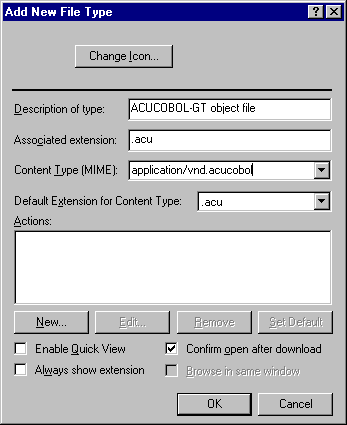
5. Click inside each field in the box and do the following:
| Field
| Action
|
| Description of type:
| Type "ACUCOBOL-GT object file"
|
| Associated Extension:
| Type ".acu"
|
| Content Type (MIME):
| Type "application/vnd.acucobol"
|
6. Click "New." The "New Action" dialog box displays.
7. Click inside each field in the box and do the following:
| Field
| Action
|
| Action:
| Type "OPEN"
|
| Application used to perform action:
| Browse to and select ACUCOBOL-GT runtime file "wrun32.exe". Click at the end
of this field and type " "%1"". This denotes the complete path to the COBOL
program file. Quotes must be included as shown below.
|
The "New Action" box should look something like this:

8. Click "Ok" to accept the new action.
9. Click "Ok" to accept the new file type.