


This diagram depicts how the Terminal Manager relates to hardware and other software in your system:
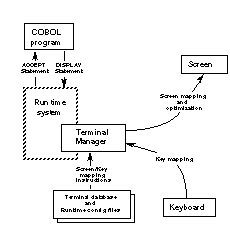
Many Terminal Manager functions depend on the data in two files:
 the terminal database file, a text file that maps screen and keyboard hardware signals of different
terminals to common codes. The file contains signal-to-code sets for many popular
terminals. In this chapter, the codes for screen and keyboard signals will
generally be called terminal function codes. The term key codes will be used to refer to the subset of terminal function codes that deals with
the keyboard.
the terminal database file, a text file that maps screen and keyboard hardware signals of different
terminals to common codes. The file contains signal-to-code sets for many popular
terminals. In this chapter, the codes for screen and keyboard signals will
generally be called terminal function codes. The term key codes will be used to refer to the subset of terminal function codes that deals with
the keyboard.
Terminal function codes enable the Terminal Manager to handle I/O between application programs and a variety of terminals without any program changes; you only need to tell the Terminal Manager what terminal you will be using. Some of the codes can also be used to customize terminal actions, as described throughout this chapter.
the runtime configuration file, a text file which includes variables that help define how the screen, the
keyboard, and the user's keystrokes will be handled. Relevant runtime configuration variables are
described in detail later in this chapter. They are often used in conjunction
with the key codes and terminal function codes mentioned above.