


ACUCOBOL-GT is an ANSI(R) 1985 COBOL compiler designed to provide a powerful development environment for a wide range of computers.
Fast compile speed, clear error messages, and a multi-window source level debugger work together to provide a high performance, easy to use COBOL development platform.
Portable object code, a generic interface to a variety of file systems, and a device-independent terminal interface help to simplify the distribution of applications developed with ACUCOBOL-GT.
ACUCOBOL-GT is a single-pass compiler that produces an object file.
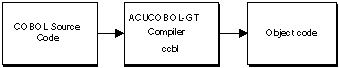
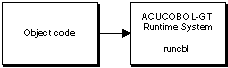
The object file is ready to be run by the ACUCOBOL-GT runtime system (referred to in this manual as runcbl). No linking step is required.
One of the prime focuses of the product is program portability. ACUCOBOL-GT offers source code compatibility modes for three popular compilers:
 Ryan McFarland's RM/COBOL(TM)
Data General Corporation's Interactive COBOL (ICOBOL)
Digital Equipment Corporation's VAX(TM) COBOL
This allows programs to be moved to or from these environments with minimum effort.
ACUCOBOL-GT also has a fully portable object code. Any program compiled on one machine using ACUCOBOL-GT will run unmodified on any other machine that supports ACUCOBOL-GT--recompiling is not required. This allows the developer access to a diverse user base with a minimum investment in hardware.
In addition, developers can modify many aspects of the runtime environment on a site-by-site or user by user basis without recompiling. This is accomplished in a small text file known as a COBOL configuration file, and by environment variables:
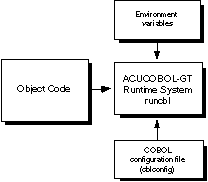
For example, the location of data files, names of devices, color, text of error messages, file buffering, and screen editing functionality can all be maintained outside of the compiled programs. For maximum flexibility, we strongly encourage you to review Book 4, Appendix H for configuration variables that may be useful to your site.
If machine-specific behavior is required, a program can directly inquire what type of machine it is running on. All of these features work together to allow the developer to support a wide range of machines with a minimum amount of resources.
ACUCOBOL-GT includes broad programming and runtime support for adding a native Graphical User Interface (GUI). In addition, many graphical elements, such as floating windows, labels, entry fields, push buttons, radio buttons, check boxes, list boxes, and combo boxes are emulated with character-based components when run on text-mode systems. Some graphical elements are not emulated in text-mode environments and are simply ignored by the runtime (see Book 2, Chapter 1).
ACUCOBOL-GT GUI syntax extensions make it easy to implement specialized user interfaces that are well suited to both graphical and character-based systems, and which remain fully portable. For a discussion of user interface development approaches, see Book 2, Chapter 1, section 1.7.
The graphical capabilities supported in ACUCOBOL-GT include:
syntax extensions for creating floating windows, toolbars, and controls (such
as buttons, entry fields, and labels)
support for creating and managing menu bars with pull-down submenus
configuration variables for customizing windows, importing icons, and mapping
colors
library support for host specific features such as file open and save-as dialog boxes, message boxes, font selections, print spoolers, and
context-sensitive help
ACUCOBOL-GT also includes a generic architecture for connecting to file systems. This means that developers can choose from a variety of file systems and database management systems, as shown in the following diagram:
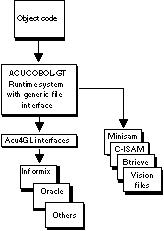
ACUCOBOL-GT is shipped with the Vision file system. Acucorp's interfaces to other file systems are licensed separately.
Acu4GL
ACUCOBOL-GT uses Acu4GL(TM) libraries to access information stored in relational database management systems (RDBMSs). Data dictionaries generated by the compiler guide the libraries in mapping the field names and data types that are passed between COBOL and the database engine.
The essence of Acu4GL libraries is that standard COBOL I/O statements are used to access databases.
Acu4GL dynamically generates industry-standard SQL from the COBOL I/O statements. As the ACUCOBOL-GT runtime module is executing your COBOL application, Acu4GL is running "behind the scenes" to match up the requirements and rules of both COBOL and the RDBMS to accomplish the task set by your application. This means that Acu4GL utilizes the full power designed into the database engine.
AcuBench
The AcuBench(TM) workplace integrates Acucorp's development tools and helps speed application development via three main components: a Project manager, a COBOL-friendly Code Editor, and a Screen Painter. This product is available for Windows 95 and Windows NT environments.
AcuODBC
AcuODBC(TM) is a driver program that gives ODBC-enabled Windows applications seamless access to Acucorp's Vision indexed file system.
Whether your Vision data is on a Windows machine, network server, or UNIX server, AcuODBC can make it accessible to many popular Windows applications, including Excel, Word for Windows, Access, and MS Query. AcuODBC opens up the world of COBOL data to existing Windows users. It also lets COBOL users take advantage of the graphing, reporting, and other personal productivity functions so common to Windows applications.
AcuConnect
AcuConnect(TM) is an add-on module that lets you distribute application processing between client and server macines. Standard COBOL CALL syntax provides the mechanism that launches portions of the application on a remote machine.
AcuServer
AcuServer(TM) is an add-on module that provides remote file access services to ACUCOBOL-GT applications. AcuServer is available for applications running on most UNIX, Windows NT (Intel), Windows 95, Windows, and DOS TCP/IP based networks and executing with a client-enabled ACUCOBOL-GT runtime.
With AcuServer, your applications gain:
the ability to create and store data files on any UNIX or Windows NT (Intel)
server equipped with AcuServer
full function remote access from UNIX, Windows NT (Intel), Windows 95,
Windows, and DOS clients to all Vision, relative, sequential, and object files stored
on an AcuServer server
full record locking support of all Vision and relative files
transparent access of remote and local files
AcuServer is described briefly in Chapter 5 of this book. A separate AcuServer User's Guide is included with the server software and provides additional details.