


In the "plugins" directory on the client machine (the directory containing "NPacu32.dll"), there is an authorization file called "acuauth.txt". It contains one line that specifies a list of directories where COBOL programs may create or delete files and subdirectories. Note that each path must be enclosed in quotation marks.
The default "acuauth.txt" file contains the path to a temporary directory. This allows applications that create local temporary files to work immediately. If a COBOL application requires access to other directories or disks on the user's machine, it should instruct the user to add those directories to the "acuauth.txt" file. For example, if an application receives file status "37,07" (access denied) when trying to open a file on the local machine, it can display a message to the user indicating the problem and instruct the user to add the directory to the end of the first line of the "acuauth.txt" file. Note that all files and folders of the directories in this file become accessible.
FILE_PREFIX is initially set to the value of the "acuauth.txt" file. If you define an alternate FILE_PREFIX in the configuration file that you embed with your object library, that value overrides the "acuauth.txt" setting. The COBOL program may use ACCEPT FROM ENVIRONMENT to get the initial value of FILE_PREFIX and add to it or reset it. APPLY_FILE_PATH may come in handy for existing programs. The override is generally only useful if you set FILE_PREFIX with remote name notation for use with AcuServer. If you specify local directories in FILE_PREFIX, please note that your program will only have permission to access to these directories if users adds them to the "acuauth.txt" file on their machines. If the files being accessed are indexed files, the user must also have a local or network floating license installed.
By default, COBOL programs that are run using the plug-in are not allowed to call the following library routines: C$CHAIN, C$MEMCPY, C$RUN, M$ALLOC, M$FREE, M$GET, M$PUT, C$SYSTEM, REG-CREATE-KEY, REG-CREATE-KEY-EX, REG-DELETE-KEY, REG-DELETE-VALUE, REG-SET-VALUE, REG-SET-VALUE-EX, and SYSTEM. Calling any of these routines results in a failure. If the CALL statement has no EXCEPTION phrase, the plug-in displays the message "call_name: Access denied", where "call_name" is the name of the library routine and where "call_name" terminates the COBOL program. C$CALLERR returns error code 23 if access was denied for the previous CALL.
If you want to allow programs executed by the plug-in to call a library routine that is normally disallowed, you should instruct your users to add a line to the "acuauth.txt" file containing the name of the routine. In addition, if you want to allow programs executed by the plug-in to call DLLs, instruct your users to add a line containing the word "DLL."
To minimize the amount of work required by users, we recommend that you write your application in such a way that resources are always accessed remotely (using AcuConnect and AcuServer). If your application requires access to local resources or local network resources, your users will have to edit the plug-in authorization file accordingly. Refer to section 5.7.1 Installing the Plug-in for information on editing this file. If you are using AcuConnect or AcuServer, keep in mind security considerations. See section 6.6 for information on AcuConnect port numbers and section 3.6 for information on AcuServer port numbers.
Please note that programs run with the plug-in can use ActiveX and OLE to cause damage to an end user's computer system or corrupt memory through pointers or working-storage tables. To help reduce the chances of this happening, the plug-in warns end users and asks them to accept responsibility.
The message is as follows:
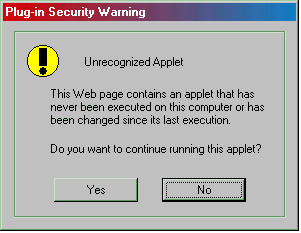
"No" is the default. Once end users provide a response, that information is added to their "acuauth.txt" file so that they don't have to respond to the same query every time they run the application in question.