The NUMERIC directive allows you to treat a data item as an unsigned integer when it is declared as alphanumeric. You might use this when the data stored in the item is always numeric.
Syntax
$XFD NUMERIC
or
*(( XFD NUMERIC ))
Example
The PATIENT-ID field (now appearing in the database table as the PATIENT column) is defined in the source code as being a text field. Since this field will always contain a number, you may want to define it in the database table as numeric. (Note the use of two directives for the same data item here.)
       FILE SECTION.
       FD  qa-file.
      $XFD COMMENT  This is a sample file demonstrating directives.
       01  qa-record.
           03  animal-info.
      *((XFD NAME=PATIENT, NUMERIC ))
               05  patient-id                  pic x(5).
               05  atype                       pic x.
               05  ctype redefines atype       pic x.
               05  dtype redefines atype       pic x.
               05  otype redefines atype       pic x.
           03  owner-info.
               05  phone                       pic x(8).
      *(( XFD COMMENT ACUODBC READ-ONLY ))
               05  owner                       pic x(30).
           03  financial.
               05  acct_no.
                   10  year                    pic x(2).
                   10  seq_no                  pic x(4).
      *(( XFD DATE=mmddyyyy, USE GROUP ))
               05  last_visit.
                   10  mm                      pic 9(2).
                   10  dd                      pic 9(2).
                   10  yyyy                    pic 9(4).
      $XFD COMMENT ACUODBC HIDDEN
               05  fee                         pic s9(5)v99.
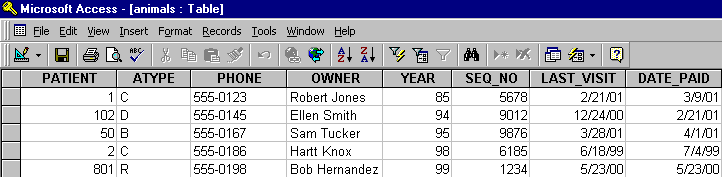
The following table is the result, and, in the database, PATIENT is now of type NUMBER.