The DATE directive creates a map between the Windows application date fields and COBOL numeric fields. Because there's no COBOL syntax that identifies a field as a date, you should add this directive to differentiate dates from other numbers. This way, when a user of a Windows application requests date information, AcuODBC can respond properly.
Syntax
$XFD DATE=date-format-string
or
*(( XFD DATE=date-format-string ))
The DATE directive implies the NUMERIC directive.
The date-format-string is a description of the desired date format, composed of characters from the following list:
Y = year (2 or 4-digit)
M = month (01 - 12)
D = day of month (01 - 31)
J = Julian day (00000000 - 99999999)
E = day of year (001 - 366)
H = hour (00 - 23)
N = minute
S = second
T = hundredth or thousandth of a second
Any other characters cause the date format string to be invalid, and result in a "corrupt XFD" error or a compile-time warning.
Each character in a date format string can be considered a place holder that represents the type of information stored at that location. The characters also determine how many digits will be used for each type of data.
For example, although you would typically represent the month with two digits, if you specify MMM as part of your date format, the resulting date uses three digits for the month, left-zero-filling the value. If the month is given as M, the resulting date uses a single digit, and truncates on the left.
If you don't specify a date-format-string, the default is YYMMDD if the field has six digits, or YYYYMMDD if the field has eight digits.
Julian dates
Because the definition of Julian day varies, the DATE directive offers a great deal of flexibility for representing Julian dates. Many source books define the Julian day as the day of the year, with January 1st being 001, January 2nd being 002, and so forth. If you want to use this definition for Julian day, simply use EEE (day of year) in your date formats.
Other reference books define the Julian day as the number of days since some specific "base date" in the past. This definition is represented in the DATE directive with the letter J (for example, a six-digit date field would be preceded with the directive "$XFD DATE=JJJJJJ"). The default "base date" for this form of Julian date is January 1, 1900.
You may define your own base date for Julian date calculations by setting the Julian Base Date field on the Advanced tab in the AcuODBC Configuration property sheet. See section 3.3, "Advanced Options" for more information.
Using group items
You may place the DATE directive in front of a group item, so long as you also use the USE GROUP directive.
Examples
The source code for the "animals" table contains a group item for the date of the animal's last visit, and an elementary item for the date of the last payment:
               05  last_visit.
                   10  mm                      pic 9(2).
                   10  dd                      pic 9(2).
                   10  yyyy                    pic 9(4).
      $XFD COMMENT ACUODBC HIDDEN
               05  fee                         pic s9(5)v99.
               05  date_paid                   pic 9(8).
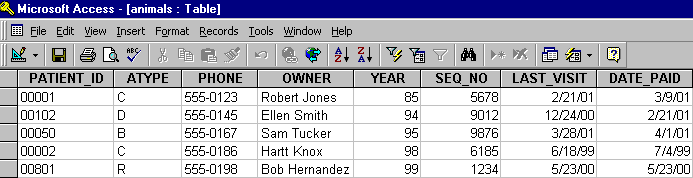
The date portions of a database table based on source code with this FD look similar to this. (Remember that the "fee" column is now hidden.) All of these date-related fields are of type NUMBER in the (Access) database.

The examples that follow build on this source code.
Example 1 - Elementary data item, DATE directive
The "date_paid" field is defined in the sample file as an elementary item of type NUMBER. Inserting the DATE directive before this line maps the type to DATE/TIME (in Access) and changes the format of the date in the table, as shown below.
       FILE SECTION.
       FD  qa-file.
      $XFD COMMENT  This is a sample file demonstrating directives.
       01  qa-record.
           03  animal-info.
               05  patient-id                  pic x(5).
               05  atype                       pic x.
               05  ctype redefines atype       pic x.
               05  dtype redefines atype       pic x.
               05  otype redefines atype       pic x.
           03  owner-info.
               05  phone                       pic x(8).
      *(( XFD COMMENT ACUODBC READ-ONLY ))
               05  owner                       pic x(30).
           03  financial.
               05  acct_no.
                   10  year                    pic x(2).
                   10  seq_no                  pic x(4).
               05  last_visit.
                   10  mm                      pic 9(2).
                   10  dd                      pic 9(2).
                   10  yyyy                    pic 9(4).
      $XFD COMMENT ACUODBC HIDDEN
               05  fee                         pic s9(5)v99.
      $XFD DATE=MMDDYYYY
             05  date_paid                     pic 9(8).
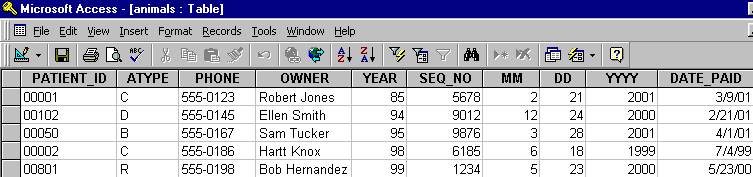
The resulting entries in a database table look similar to the following.
Example 2 - Group data item, DATE and USE GROUP directives
If your date information is defined as a group item, you must use both the DATE and USE GROUP directives to map your COBOL numeric data items to Windows application date fields. Insert the directives on the line preceding the group item.
       FILE SECTION.
       FD  qa-file.
      $XFD COMMENT  This is a sample file demonstrating directives.
       01  qa-record.
           03  animal-info.
               05  patient-id                  pic x(5).
               05  atype                       pic x.
               05  ctype redefines atype       pic x.
               05  dtype redefines atype       pic x.
               05  otype redefines atype       pic x.
           03  owner-info.
               05  phone                       pic x(8).
      *(( XFD COMMENT ACUODBC READ-ONLY ))
               05  owner                       pic x(30).
           03  financial.
               05  acct_no.
                   10  year                    pic x(2).
                   10  seq_no                  pic x(4).
      *(( XFD DATE=mmddyyyy, USE GROUP ))
               05  last_visit.
                   10  mm                      pic 9(2).
                   10  dd                      pic 9(2).
                   10  yyyy                    pic 9(4).
      $XFD COMMENT ACUODBC HIDDEN
               05  fee                         pic s9(5)v99.
      $XFD DATE=MMDDYYYY
               05  date_paid                   pic 9(8).
The resulting table now has a column with the name of the group item ("last_visit"), which is defined as type DATE/TIME (in Access).