


In addition to describing the directives you can include in your COBOL file's FD section, this section provides sample code and examples based on the sample files, "animals.cbl" and "file_dir.cbl" that come with AcuODBC. (These files are located with the other files that make up the AcuODBC Datasource DSN.) These files were developed with ACUCOBOL-GT on a Windows NT system. The files were compiled with the following command:
ccbl32 -zd -v -fxa animals.cbl
After successful compilation, the Vision file was created with the following command:
wrun32 animals
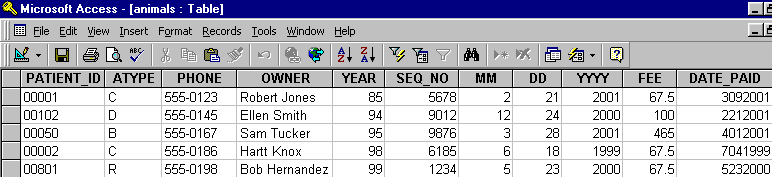
The tables resulting from these files are displayed in Microsoft Access 97. See "To access data from Access 2000" in Chapter 4 for more information on linking versus exporting and for information on bringing external data into the database.
The following code is the FD for the source "animals.cbl" file. Note that this is a highly simplified example intended only to demonstrate the use of directives. You would not insert data into a table with this design.
       FILE SECTION.
       FD  qa-file.
       01  qa-record.
           03  animal-info.
               05  patient-id                  pic x(5).
               05  atype                       pic x.
               05  ctype redefines atype       pic x.
               05  dtype redefines atype       pic x.
               05  otype redefines atype       pic x.
           03  owner-info.
               05  phone                       pic x(8).
               05  owner                       pic x(30).
           03  financial.
               05  acct_no.
                   10  year                    pic x(2).
                   10  seq_no                  pic x(4).
               05  last_visit.
                   10  mm                      pic 9(2).
                   10  dd                      pic 9(2).
                   10  yyyy                    pic 9(4).
               05  fee                         pic s9(5)v99.
               05  date_paid                   pic 9(8).
With each directive, a new line is added to the code. Examples in each section will show the code and also show the resulting database table, where appropriate. If you are working on a different system, you may use different commands to compile "animals.cbl" and to create the Vision file. If you are using an application other than Microsoft Access 97, the resulting tables may look different.
The following table was imported into Microsoft Access 97 based on the FD above. You may want to note the changes as directives are added to the FD.
The file "file_dir.cbl" is used only when describing the FILE directive. The sample source code is shown there.