


The Acu4GL product ensures that all changes to your database are immediately available to your COBOL program. Also, it ensures that all data updates introduced by your COBOL program are immediately reflected in the database.
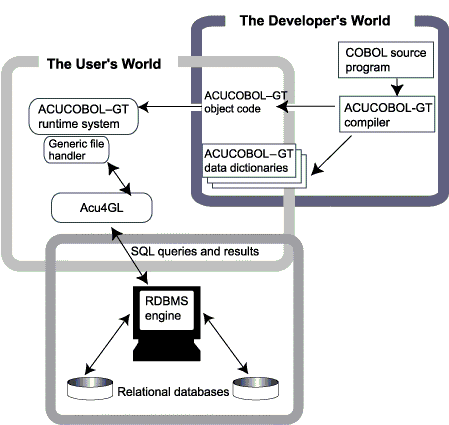
After your ACUCOBOL-GT data dictionaries have been generated, you can switch to a different RDBMS simply by linking in a different Acu4GL module and setting DEFAULT-HOST to point to the new RDBMS. No recompiling is necessary.
Because Acu4GL accesses the database through its native engine, the full relational integrity of the database is maintained. The COBOL program need not be concerned about enforcing relationships between keys and foreign keys on tables, constraints on field relationships and contents, and so forth.
If you have specified that a file is to reside on a RDBMS by setting either DEFAULT_HOST or filename_HOST, an OPEN OUTPUT filename statement in your COBOL program will automatically generate a CREATE TABLE filename function on the specified host database. Appropriate permissions will be granted based on your login and password, and on access parameters you have set. See the on-line help table of contents to find the appendix specific to your RDBMS for details. If a table will eventually be of a large size, you may wish to have your systems database administrator create the table and indexes for you. Databases offer many different methods of creating tables that may improve performance for large tables, such as spreading the table across multiple hard drives, or storing the data and the indexes on different drives.
It is possible that there are ACUCOBOL-GT library routines that do not work with or do not make sense to use with some of the Acu4GL products. To find out if that is the case with your Acu4GL product, look in the "Common Questions and Answers" section of the appendix specific to your product.