BITMAP-HANDLE (numeric) Identifies the handle of a loaded bitmap, so that images from that bitmap can be shown in items in the Tree-View. You obtain the bitmap handle by calling the library routine W$BITMAP with the WBITMAP-LOAD option. The bitmap is treated as a bitmap strip - a series of fixed-width images laid out side-by-side in a single bitmap. The images are numbered sequentially, starting at "1". Note that you have only one bitmap strip for the entire control, although you can select individual images out of this strip for each item. See BITMAP-NUMBER. (create, modify, inquire)
BITMAP-NUMBER (numeric) Identifies the bitmap image that will be displayed for the item identified by ITEM. If you do not specify a bitmap number for a particular item, that item will use bitmap number "1". Note that you can show different bitmaps for expanded or collapsed items by changing an item's BITMAP-NUMBER in response to the MSG-TV-EXPANDING event. (create, modify, inquire)
BITMAP-WIDTH (numeric) Sets the width of the images in the bitmap strip described by BITMAP-HANDLE. If not set, then the images default to 16-pixels wide. You should set this to match the actual width of the images that make up the bitmap strip. (create, modify, inquire)
ENSURE-VISIBLE (numeric) When set to a valid item ID, ensures that that item is visible in the control. This may expand collapsed items and may cause scrolling. (create, modify)
EXPAND (numeric) Programmatically expands or collapses the item identified by the ITEM property. If you set EXPAND to TVFLAG-EXPAND, the item is expanded. To collapse the item, set EXPAND to TVFLAG-COLLAPSE. These constants are defined in "acugui.def". Set to zero when you want no action to occur. (create, modify)
HIDDEN-DATA (alphanumeric) Allows the program to store data that is not displayed in an item. Hidden data is limited to 255 bytes per item. Hidden data may be any format, including non-printing characters. This property acts on the item identified by the ITEM property. (create, modify, inquire)
HAS-CHILDREN (numeric) When set to a non-zero value, indicates that the item identified by ITEM has child items even if there are no child items in the control. When set to zero (the default), an item has children only if they are physically present in the control. This property is useful when it is impractical to place all of a tree's items in the control all at once. In this approach, you do not place child items in the tree, but you mark which items have children via this property. Then, when the user expands a particular item, you have the program respond to the MSG-TV-EXPANDING event by adding the appropriate child items to the control. The HAS-CHILDREN property informs the control which items can be expanded. (create, modify)
ITEM (numeric) This property is used in conjunction with other properties to identify which item to affect. Typically, you set ITEM to the ID of the item to act on and then set another property to perform the action. Note that you must set ITEM before the other property to get the desired results. ITEM is the "index" for the Tree-View control (see the MODIFY and INQUIRE statements for a description of indexes).
ITEM-TO-ADD (alphanumeric) Places a new item in the Tree-View control. The text assigned to ITEM-TO-ADD is placed as a new item in the control. Its position in the hierarchy is determined by the PARENT and PLACEMENT special properties. The return value from this property is the ID of the new item. If the new item is successfully added, the ITEM property is set to point to this item (this makes attaching a bitmap or hidden data to the item easier - see BITMAP-NUMBER and HIDDEN-DATA). (create, modify)
ITEM-TO-DELETE (numeric) When set, deletes the item whose ID matches the assigned value. If you place this in the Screen Section, then set this value to NULL to ensure that you do not accidentally delete items. (create, modify)
ITEM-TO-EMPTY (numeric) Deletes all child items of the item whose ID is assigned to this property. When set to NULL, has no effect. (create, modify)
NEXT-ITEM (numeric) Setting this property returns a specific item ID. The new item found depends on the value used:
| Value
| Item Found
|
| TVNI-CHILD
| First child of the current ITEM
|
| TVNI-FIRST-VISIBLE
| First item currently visible in control
|
| TVNI-NEXT
| Next sibling of the current ITEM
|
| TVNI-NEXT-VISIBLE
| Next visible item after ITEM
|
| TVNI-PARENT
| Parent item of the current ITEM
|
| TVNI-PREVIOUS
| Previous sibling of ITEM
|
| TVNI-PREVIOUS-VISIBLE
| Previous visible item before ITEM
|
| TVNI-ROOT
| Topmost item in the entire control |
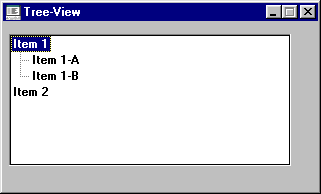
In the following example, four items are added to a Tree-View control. The first item is a parent to the next two items, and the last item is on the top level like the first:
77  ID-1             USAGE POINTER.

  MODIFY TREE-VIEW-1, ITEM-TO-ADD = "Item 1", GIVING ID-1,
    PARENT = ID-1,
    ITEM-TO-ADD = "Item 1-A",
    ITEM-TO-ADD = "Item 1-B",
    PARENT = 0,
    ITEM-TO-ADD = "Item 2"
The resulting tree looks like this:
PLACEMENT (numeric) Works in conjunction with PARENT to determine where new items are located in the hierarchy. The PLACEMENT value affects the location within a given sub-level (i.e., the list of items that have the same parent). If PLACEMENT is set to a valid item ID (whose parent is PARENT), then the new item is placed immediately after this item. Alternatively, you can use any one of the following special values (defined in "acugui.def"):
| TVPLACE-FIRST
| Item placed first in the list
|
| TVPLACE-LAST
| Item placed last in the list
|
| TVPLACE-SORT
| Item sorted alphabetically in the list |
In the following example, items are sorted alphabetically except at the top level:
77  ID-1        USAGE POINTER.
  77  ID-2        USAGE POINTER.

  MODIFY TREE-VIEW-1, ITEM-TO-ADD = "Ordinals", GIVING ID-1
    PARENT = ID-1, PLACEMENT = TVPLACE-SORT,
    ITEM-TO-ADD = ( "First", "Second", "Third",
     "Fourth" )
    PARENT = 0, PLACEMENT = TVPLACE-LAST,
    ITEM-TO-ADD = "Cardinals", GIVING ID-2,
    PARENT = ID-2, PLACEMENT = TVPLACE-SORT,
    ITEM-TO-ADD = ( "One", "Two", "Three",
     "Four" ).
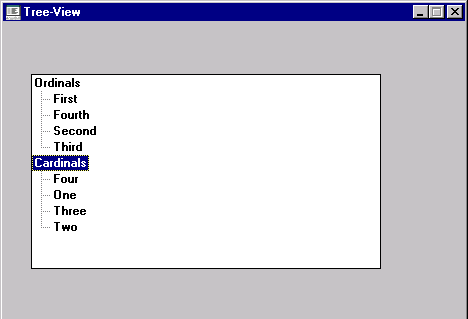
The resulting tree looks like this: