


5.11 Bar

The BAR control draws a line on the screen. The line can be either horizontal
or vertical, and can be any width. Several options allow you to produce
special effects such as double lines and raised or engraved lines. Additional
options allow lines to be joined together to form rectilinear objects and shapes.
Portability note: The bar control is available for both character-based systems and graphical
environments. However, on character-based systems, the DOTTED, DASHED, and
DOT-DASH styles are not supported. The following special properties are also not
supported on character systems: WIDTH, COLORS, SHADING, POSITION-SHIFT,
TRAILING-SHIFT, and LEADING-SHIFT.
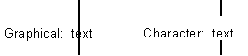
Note: In a graphical environment, the bar control covers any portion of text that
occupies the same space as the bar. In character-based environment, the bar
does not cover the text, and it is displayed as a broken line. See the
following example:
Bar controls are drawn in the order created. This can be important when you
are overlapping bars to create junctions.
More:
Common Properties
Special Properties
Events