


When Vision writes a record to a file, its normal algorithm is to first add the record, then add the primary key, then add the first alternate key and so on until all the keys have been added. This is the algorithm one expects and is generally required to correctly support the WRITE verb.
Vision also has another technique that it can use to add records to a file. This technique does not write the keys to the file when it adds the record. Instead, it adds many records to the file first, then it gathers all the primary keys for those records and adds them, then it gathers all the first alternate keys and adds them and so on. By adding many keys at once, Vision can be much more efficient in its handling. This has two benefits:
1. The time it takes to add a large number of records using this technique is generally much smaller than using the normal technique; and
2. The resulting file is more efficiently organized, with all of the blocks associated with a particular key near each other on disk.
This technique of adding records to a file is called "bulk addition" mode. It is available only for Vision files. It may be used with any format Vision file.
You can use bulk addition mode in your programs. This is most useful in programs that add a large number of records to a file at once. It is less useful in programs that do operations other than WRITE on a file, or programs that do not write many records. Some typical applications for bulk addition mode are:
While bulk addition mode has fairly specialized uses, its benefits are high in these cases.
Bulk addition mode can provide substantial performance improvements over other techniques, including MASS-UPDATE mode. These improvements become more noticeable as the file grows and in files with a large number of alternate keys. For files with few records, bulk addition mode can be slightly less efficient than the normal WRITE technique.
Using bulk addition affects some of the standard COBOL file handling rules. These are described in a separate section below.
Using bulk addition
To use bulk addition on a file, open that file with the BULK-ADDITION phrase. For example:
OPEN OUTPUT MY-FILE FOR BULK-ADDITION
If you specify BULK-ADDITION for a file other than a Vision file, the effect is the same as if you had specified MASS-UPDATE instead.
Vision allocates a memory buffer for each file opened for bulk addition. The size of this buffer is controlled by the V-BULK-MEMORY configuration option. The default size of this buffer is 1 MB. The default size is fairly large because it is assumed that only a few files will be open for bulk addition on a system at any one time. If this buffer cannot be allocated, the OPEN fails with a status indicating inadequate memory.
When a WRITE occurs for a file opened for bulk addition, only the record is actually written to the file. The keys for the record are not written out until later. When an operation occurs on the file other than a WRITE, that operation is suspended and all of the records with missing keys have their keys added. After this completes, the suspended file operation resumes.
The process of adding keys uses the memory buffer allocated when the file was opened. The algorithm is to fill the buffer with keys, sort them, and then add them to the file. This is repeated until all the missing keys have been added. The larger the memory buffer, the more efficient this process is.
When adding records to the file, Vision always places the records at the end of the file when using bulk addition. It does not re-used deleted record areas in this case. It does this to make the process of gathering the missing keys efficient. If you need to recover the deleted record disk space, you can rebuild the file with vutil to do this.
Effect on COBOL rules
When you open a file for bulk addition, the regular rules of COBOL file handling are changed for that file, until that file is closed. The following changes apply:
1. File status "02" (record written contains an allowed duplicate key value) is never returned by WRITE.
2. File status "22" (record not written because it contained a disallowed duplicate key value) is not returned by WRITE. See the next section for a discussion of how illegal duplicate keys are handled.
3. File status "24" (disk full) may occur on file verbs that normally cannot produce this status. This occurs because the verb (for example, READ) triggered writing of the keys to the file and the disk became full while doing this.
4. Records may be rejected as having illegal duplicate keys that would not normally be rejected. The circumstance under which this occurs is described in the next section.
Duplicate key handling
Because keys are not written at the time a new record is written, the WRITE statement never gets a duplicate key error status (status 22). When you are using bulk addition, illegal duplicate keys are handled in a different manner.
When the keys are added to the file, any illegal duplicates are detected then. Should a record be found that contains an illegal duplicate key value, that record is deleted. Your program is informed of this only if it contains a valid declarative for the file. If there is no declarative available, the record is quietly deleted. Otherwise, the file status data item is set to "22", the file's record area is filled with the contents of the rejected record, and the declarative executes. When the declarative finishes, the file record area is restored to its previous contents so that it contains the correct data when the suspended file operation resumes.
When the file's declarative executes in this way, the program may not perform any file operations in the declarative. This is because the program is in the middle of doing a file operation already, the one that triggered the addition of the keys. In addition, the declarative may not start or stop any run units (including chaining), nor may it do an EXIT PROGRAM from the program that contains the declarative. Finally, note that the declarative runs as a locked thread--no other threads execute while the declarative runs.
You can configure Vision to write any rejected records to a file. This gives you a way to log the rejected records even though you may not perform a file operation from within your declarative. To create this log, set the configuration variable "DUPLICATES-LOG" to the name of a file where you want to store the records. Vision will erase this file first if it already exists. You must use a separate log file for each file opened with bulk addition. You can do this by changing the setting of "DUPLICATES-LOG" between OPEN statements. For example:
SET ENVIRONMENT "DUPLICATES-LOG" TO "file1.rej"
OPEN OUTPUT FILE-1 FOR BULK-ADDITION
SET ENVIRONMENT "DUPLICATES-LOG" TO "file2.rej"
OPEN EXTEND FILE-2 FOR BULK-ADDITION
If DUPLICATES-LOG has not been set or is set to spaces, then no log file is created.
In addition, the duplicate-key log file may not be placed on a remote machine using AcuServer. The log file must be directly accessible by the machine that is running the program.
Any record that Vision rejects due to an illegal duplicate key value is written to the log file. The format of the file is a binary sequential file with variable-size records. You can read this file with a COBOL file that has the following layout:
FILE-CONTROL.
     SELECT OPTIONAL LOG-FILE
     ASSIGN TO DISK file-name
     BINARY SEQUENTIAL.

FILE SECTION.
FD    LOG-FILE
      RECORD IS VARYING IN SIZE DEPENDING ON REC-SIZE.
01    LOG-RECORD.
      <<indexed record layout goes here>>

WORKING-STORAGE SECTION.
77    REC-SIZE                PIC 9(5).
If no duplicate records are found, the log file is removed when the Vision file is closed.
There is an unusual circumstance that can cause a file opened for bulk addition to reject a record that would not have been rejected if the file had been opened normally. This occurs only when the file has at least one alternate key that does not allow duplicates. This happens due to the changed order in which the keys are written to the file.
Consider a case where a file has two numeric keys, the primary key and one alternate that does not allow duplicates. Now suppose the following three records were written to this newly created file:
| Primary key
| Alternate key
|
| 1
| 1
|
| 2
| 1
|
| 2
| 2 |
If the file is opened for bulk addition, the three records are added, then the primary keys are added, then the alternate keys are added. First the three records are added. Then the first and second record's primary keys are added. The third record's primary key is rejected because it duplicates the second record's key. The third record is removed as a result of this. Then the alternate keys are processed. The first record's key adds fine. The second record's key is rejected because it is a duplicate, and the second record is removed. The third record's alternate key is not processed because that record has already been removed. The result is a one record file, the record (1,1).
To summarize, as a result of bulk addition, you may end up with records rejected because of the duplicate key conflict with other (eventually) rejected records and not necessarily with any accepted records.
This difference would not occur if the keys were added "row-wise" instead of "column-wise", but doing so would sacrifice much of the efficiency gained by bulk addition mode.
In most practical applications, this scenario is not very likely. If need be, you can adjust for this difference by logging the rejected records and then trying to add them to the file normally after leaving bulk-addition mode. The second attempt at writing out the records will still reject the records with illegal duplicates, but take any records that conflict only with other rejected records.
Because of the various issues surrounding illegal duplicate key values, it is best to use bulk addition in cases where illegal duplicates are rare. Processing records with a great many illegal keys significantly reduces the performance benefits of using bulk addition.
Progress reporting
Programs that use bulk addition are frequently the types of programs where it is desirable to report the program's progress to the user. For example, a program that reformats a file would typically display its percentage complete while running. However, a single COBOL statement may represent the majority of the running time, so progress reporting is difficult to do. The file reformatting program, for example, could spend 20% of its time writing out the reformatted records and 80% of its time in the CLOSE statement while the records are having their keys written.
You can use a special declarative section to do progress reporting. This section is called directly by Vision in a periodic fashion while the keys are being added to the file. To create the declarative, use the following form of the USE statement:
USE FOR REPORTING ON file-name.
Vision executes this section at regular intervals. This reporting period is approximately once for each percentage point completed per key.
Because the declarative is called from within a file operation, the declarative section's code may not execute any file operations. In addition, the declarative may not start or stop any run units (including chaining), nor may it do an EXIT PROGRAM from the program that contains the declarative. Finally, note that the declarative runs as a locked thread--no other threads execute while the declarative runs.
To determine how far along Vision is in adding the keys, you can call the library routine "C$KEYPROGRESS". You pass this routine a single parameter which has the following layout:
01  KEYPROGRESS-DATA, SYNC.
    03  KEYPROG-CUR-KEY   PIC XX COMP-N.
    03  KEYPROG-NUM-KEYS  PIC XX COMP-N.
    03  KEYPROG-CUR-REC   PIC X(4) COMP-N.
    03  KEYPROG-NUM-RECS  PIC X(4) COMP-N.
A copy of this group item can be found in the COPY library "keyprog.def".
When C$KEYPROGRESS returns, the group item is filled with current data. The individual items contain the following:
You may report this information in any fashion. If you want to report the actual percentage complete, the formula is the following:
total-operations =
 keyprog-num-recs * keyprog-num-keys

operations-complete =
 (keyprog-cur-key - 1) * keyprog-num-recs + keyprog-cur-rec

pct-complete =
 (operations-complete / total-operations) * 100
That formula computes the percentage complete for just adding the keys. If you want to treat the original record writes and the adding of the keys in a single percentage scale, the formula is slightly different:
total-operations =
 keyprog-num-recs * (keyprog-num-keys + 1)

operations-complete =
 keyprog-cur-key * keyprog-num-recs + keyprog-cur-rec

pct-complete =
 (operations-complete / total-operations) * 100
Here is an example of a typical reporting declarative:
77  PROGRESS-BAR-1      HANDLE OF FRAME.

DECLARATIVES.
MYFILE-REPORTING SECTION.
   USE FOR REPORTING ON MYFILE.
MYFILE-REPORT.
   CALL "C$KEYPROGRESS" USING KEYPROGRESS-DATA
   MODIFY PROGRESS-BAR-1, FILL-PERCENT =
          ((((KEYPROG-CUR-KEY - 1) * KEYPROG-NUM-RECS
          + KEYPROG-CUR-REC) / (KEYPROG-NUM-RECS
          * KEYPROG-NUM-KEYS)) * 100).
END DECLARATIVES.
Bulk addition and AcuServer
You may not use bulk addition mode with files that you are accessing via AcuServer. If you attempt to do so, AcuServer will open the file in MASS-UPDATE mode instead.
Programs that are appropriate targets for bulk addition mode are generally much more efficient when run directly on the server. You can arrange to do this directly by manually starting the job on the server, or you can use AcuConnect from a workstation to remotely start the job on the server.
In addition, the duplicate-key log file may not be placed on a remote machine using AcuServer. The log file must be directly accessible by the machine that is running the program.
Using bulk addition with transactions
You may use bulk addition for files that use transaction management. No transaction management rules are affected by bulk addition.
The START TRANSACTION, COMMIT and ROLLBACK verbs are not treated as operations that trigger the bulk addition of keys. However, a ROLLBACK can cause the bulk addition of keys if it has to delete or rewrite a record as part of its operation. Note that a file's declaratives will not execute as part of a ROLLBACK process. This applies to both the error handling declarative and the progress reporting declarative.
Performance tips
Using bulk addition can provide very substantial performance gains in appropriate cases. Generally, it is best used when you are adding a large number of records to a file and has a more noticeable effect on files with a large number of records.
The following chart shows one set of execution times for creating a new file with eight 10-byte keys generated in random order and a 130 byte record size. These were run on a Windows 98 machine.
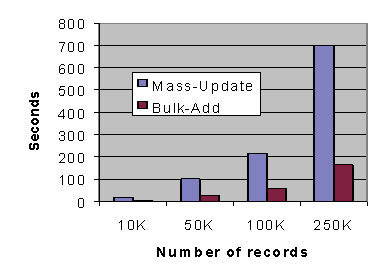
Notice how the run times for MASS-UPDATE mode rise at a much steeper rate than those for bulk addition mode as the number of records grows.
You get best performance from bulk addition when you maximize the number of records being keyed at once. This means that you want to WRITE as many records as possible to the file without performing any other intervening operations on the file.
There are two configuration variables that have an important effect on the bulk addition performance. The first of these is V-BUFFERS, which determines the number of 512-byte blocks in the Vision cache. Besides having its usual caching effect, the Vision cache is especially important when you are doing bulk addition because the cache is used to gather file blocks together into larger groups that are written out in a single call to the operating system. While the cache always does this, the bulk addition algorithm tends to produce very large sets of adjacent modified blocks, which can all be written out at once. By increasing the cache size, you can increase the number of blocks written out at once.
For this reason, you should use a cache size of at least 64 blocks. Note that this is the default cache size for most systems. If memory is plentiful, then a cache size of 128 or 256 blocks is recommended. You can go higher if you want; however, there is usually little benefit seen after about 512 blocks (256K of memory).
The other important factor is the memory buffer used to hold the keys (V-BULK-MEMORY). Unlike V-BUFFERS, this is most useful when it is large. The default size is 1 MB. Larger settings will improve performance when you are adding many records to a file. Essentially, this buffer is used to hold record keys. The more keys that it can hold, the better the overall performance. For runs that will write out between 250,000 and 500,000 records, a setting of 4 MB generally works well. For more than 500,000 records, we recommend at least an 8 MB setting. Be careful that you do not set this too large, however. If you set it so large that the operating system must do significantly more memory paging to disk, you could lose more performance than you gain. You will need to experiment to see which setting works best for your system.
Finally, the process of removing records due to illegal duplicate keys is expensive. You should try to arrange it so that bulk addition is used in cases where illegal duplicate keys are rare.
Summary
Using bulk addition can provide very significant performance gains in certain cases. These cases involve writing a very large number of records to a file. In order to optimize performance, certain rules of COBOL are changed and some other restrictions apply. Here are the key points to remember:
1. Files open for bulk addition are locked for exclusive use.
2. WRITE does not add keys to the file. The keys are added when some other file operation occurs.
3. Duplicate record errors (status "22") are not returned by WRITE. Instead, they are reported to the file's declarative procedure only during some other file operation.
4. The declarative must not perform any file operations or start or stop any run units when processing status "22".
5. You may log records rejected due to illegal duplicated keys by setting the option "DUPLICATES-LOG" to the name of the desired log file.
6. Disk space occupied by deleted records is not re-used when you are adding records with bulk addition.
7. You can report on the progress of adding the keys in a USE FOR REPORTING declarative. This declarative may not perform any file operations or start or stop any run units.
8. You may not use bulk addition on files you are accessing via AcuServer. Use AcuConnect or some other technique to start the job directly on the machine with the files.
Avoid doing an abnormal shutdown on a job running with bulk addition. If the job aborts without completing its "close" operation, the file will almost certainly have keys missing and need to be rebuilt.