


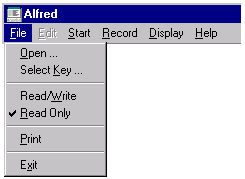
Open prompts for the name of a new file to edit.
Select Key displays a dialog box that allows you to select a new sort key.
Read/Write opens the current file I/O. You must choose this option if you want to change the contents of the data file. You can also open the file I/O with the "RW" toolbar button:

Read Only returns the current file to read-only mode. This mode ensures that changes will not be made permanent (written) in the file. By default, data files are opened in read-only mode. You can also change the input status to read-only with the "RO" toolbar button:

Print sends the entire current record to the printer.
Exit shuts down the editor.