


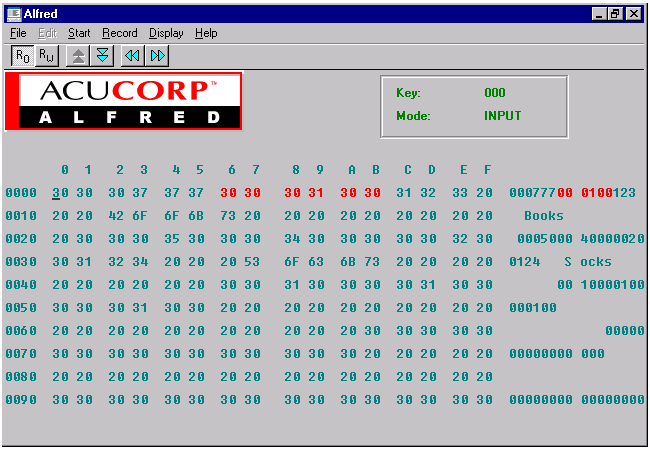
If there's no XFD file, the record is displayed in two formats. On the left side of the screen, the record is displayed in hexadecimal or octal (hexadecimal is the default). On the right side of the screen, the printable characters are displayed as themselves, and non-printable characters are displayed as a period (".").
You can use the mouse or special keys to move around the screen and change the display. The special keys work as follows:
1. The Arrow keys move around the screen.
2. The Page Up/Page Down keys display the previous/next page.
3. The Home key goes to the first byte of the record.
4. The End key goes to the last byte of the record.
5. Ctrl-X key undoes the last change. (Repeatedly pressing ctrl-x will continue to undo the last change, up to 21,000 single-byte modifications.)
6. Ctrl-T toggles between Hex and Octal display.
7. Ctrl-N gets the next record.
8. Ctrl-P gets the previous record.
9. The TAB key toggles between the binary data and the ASCII data.
In the ASCII display, you can enter any printable character. In the binary display, you can enter hexadecimal or octal characters only.