


The Run menu contains commands related to executing your program.
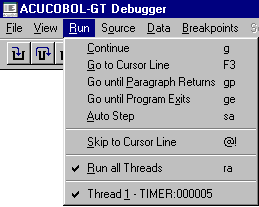
The Run Menu (Windows).
Continue resumes execution of your program from its current location. The program returns to the debugger when it reaches the next breakpoint.
The keyboard form of this command is "G".
*Go to Cursor Line sets a temporary breakpoint at the current cursor line and continues execution of your program. Press the F3 key to use this command from the keyboard. The F3 key works on lines that do not contain verbs. The closest previous line with a verb is the location used to set the breakpoint.
Go until Paragraph Returns runs your program until the current paragraph returns to the point from which it was performed.
The keyboard form of this command is "GP".
Go until Program Exits runs your program until the current program exits to its calling program. If used from inside your main program, this command runs the program until it finishes.
The keyboard form of this command is "GE".
Auto Step causes your program to execute "step" commands repeatedly until it reaches the end of the program. When you select this mode, the debugger immediately begins stepping through your program. You can change the speed at which it is stepping by typing a digit from "1" (slowest; approximately three seconds per step) to "9" (fastest; several steps per second). Press the <spacebar> to leave Auto Step mode and return to the debugger prompt.
The keyboard form of this command is "SA".
Step and P-Step are not shown on the menu but are available from the keyboard. Windows users can find equivalent commands, and others, on the toolbar provided with the debugger. The toolbar is explained at the end of section 3.1.3.
Step executes one statement of your program and then returns control to the debugger.
The keyboard command is "S". You may follow the keyboard command with a number of steps to take.
P-Step executes a "perform step." This is the same as a normal Step command, except that it includes the entire range of a PERFORM statement as a single statement. The effect is to step to the end of the performed paragraph.
The keyboard command is "P." You may follow the keyboard command with the number of "perform steps" to take.
*Skip to Cursor Line moves the current program location to the line containing the cursor. Further execution of your program will proceed from this line. The cursor line must contain a verb; otherwise the current program location does not change.
Use this command with care, because the skipped lines are not executed. You may skip important sections of code and experience unexpected results.
The keyboard form of this command is "@!".
The keyboard form of this command is "RA [#]".
Thread shows the threads contained in the program, and places a check mark next to the current thread.