1.7.1 Handling Compilation Problems
When you compile, direct the error messages to a file, and save this file to
examine. The compile command for capturing error output in a file is:
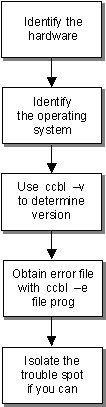
ccbl -e filename program-name
From the information in this file, you will probably be able to determine the
cause of the problem and make the necessary changes. If not, we would be
pleased to assist you. Here's an overview of the information we need to know, most
of which you can simply fax to us:
- We need to know your hardware and operating system.
- It's also helpful for us to know which version of the ACUCOBOL-GT compiler you
are using. In case you've encountered a compiler anomaly, a later version of
the compiler may solve your problem. To determine the version you are running,
type: ccbl -v
- We need a copy of the compile-time error file. If any message appears on your
screen, we need the exact text of the message.
- Finally, if you can isolate the section of the code that is causing the
problem, please fax us a printed copy of this code.