


ACUCOBOLTM-GT is part of the extendTM family of Acucorp solutions. ACUCOBOL-GT is an ANSI® 1985 COBOL compiler that also includes components of the ANSI X3.23a-1989 supplement designed to provide a powerful development environment for a wide range of computers.
Fast compile speed, clear error messages, and a multi-window source level debugger work together to provide a high performance, easy to use COBOL development platform.
Portable object code, a generic interface to a variety of file systems, and a device-independent terminal interface help to simplify the distribution of applications developed with ACUCOBOL-GT.
In addition to portable object code, ACUCOBOL-GT can generate and execute object files that contain native instructions for specific types of processors. This enables you to optimize the use of CPU resources on the host machine while maintaining full portability within the same family of processors.
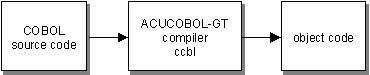
The object file is ready to be run by the ACUCOBOL-GT runtime system. No linking step is required.
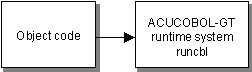
One of the primary focuses of the product is program portability.
ACUCOBOL-GT offers source code compatibility modes for four popular compilers:
This allows programs to be moved to or from these environments with minimum effort.
ACUCOBOL-GT also has a fully portable object code. Any program compiled on one machine using ACUCOBOL-GT will run unmodified on any other machine that supports ACUCOBOL-GT--recompiling is not required. This allows the developer access to a diverse user base with a minimum investment in hardware.
ACUCOBOL-GT can also generate and execute object files that contain native instructions for selected families of processors. This results in generally faster code at the cost of reduced portability and larger object files.
Generally speaking, a native-code module will be a much more efficient user of the CPU. However, a native-code module will typically be several times larger than a portable object code module. You must weigh the benefits of better CPU utilization versus the cost of more memory used. For systems where memory is tight, one solution is to use native code only for those modules that are CPU intensive while leaving the rest of the system in portable object code.
When you compile using native instructions, the resulting object file may be run only on a machine containing the appropriate processor. Note, however, that within this class of machines, the object file is still portable. For example, you could run an Intel object file on a Windows machine or on a Linux machine. There is no need (or benefit) to compile directly on the target machine.
The diagram below illustrates the portability of the native-code object files with just a few arbitrary processor/platform combinations. Please refer to section 1.4 of this chapter for the complete list of platforms supported by ACUCOBOL-GT and to subsection 1.4.1 for the complete list of processors supported by its native-code functionality.
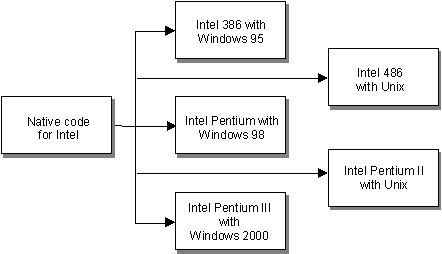
Sample diagram of arbitrary CPU/platform combinations for Intel processor family
Object files that contain native-code instructions are similar to normal COBOL object files. The only difference is the internal instruction set used. Native-code object files are run in the same fashion as normal (portable) objects: by using the runtime. The runtime acts as the memory manager and support libraries for the native-code module. You may mix native and non-native modules in a single run freely.
Users of ACUCOBOL-GT can modify many aspects of the runtime environment on a site-by-site or user-by-user basis without recompiling. This is accomplished in a text file known as a COBOL configuration file, and by environment variables:
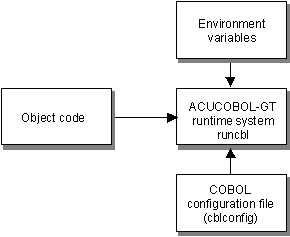
For example, the location of data files, names of devices, color, text of error messages, file buffering, and screen editing functionality can all be maintained outside of the compiled programs. For maximum flexibility, we strongly encourage you to review Appendix H in Book 4, "Appendices" for configuration variables that may be useful to your site.
If machine-specific behavior is required, a program can directly inquire what type of machine it is running on. All of these features work together to allow the developer to support a wide range of machines with a minimum amount of resources.
ACUCOBOL-GT includes broad programming and runtime support for adding a native Graphical User Interface (GUI). In addition, many graphical elements, such as floating windows, labels, entry fields, push buttons, radio buttons, check boxes, list boxes, combo boxes, and others, are emulated with character-based components when run on text-mode systems. Some graphical elements are not emulated in text-mode environments and are simply ignored by the runtime (see Chapter 1 in Book 2, "User Interface Programming").
ACUCOBOL-GT GUI syntax extensions make it easy to implement specialized user interfaces that are well suited to both graphical and character-based systems, and which remain fully portable. For a discussion of user interface development approaches, see section 1.7 in Book 2, "User Interface Programming."
The graphical capabilities supported in ACUCOBOL-GT include:
ACUCOBOL-GT also includes a generic architecture for connecting to file systems. This means that developers can choose from a variety of file systems and database management systems, as shown in the following diagram:
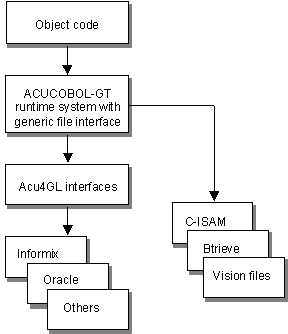
ACUCOBOL-GT is shipped with the Vision file system. Acucorp's interfaces to other file systems are licensed separately.
More: