


AcuServer provides excellent network file access performance by using sockets as the principal communication protocol. Here's why.
With the exception of a few unusual systems, remote file access always takes significantly more time than the same access made to a local file. It is not unusual for network overhead to add five fold or more to the time required to complete a common file action.
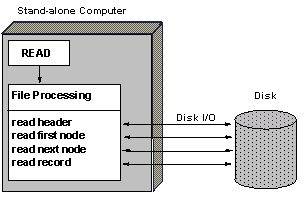
Processing a READ on a local file.
As the preceding drawing illustrates, a file access request (in this case a READ) can require multiple disk I/O actions. When these multiple disk actions are executed across the network, overhead is added to every I/O action.
Some network protocols, notably NFS (Network File System), require that each disk action be handled as a separate network transaction.
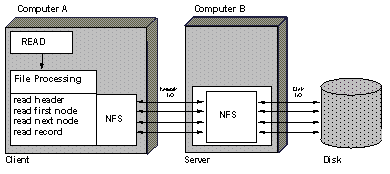
Processing a READ using NFS.
Using sockets, AcuServer executes file I/O requests with a single network transaction. In this way, AcuServer minimizes network overhead, resulting in superior performance.
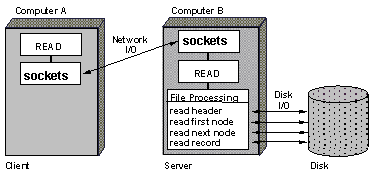
Processing a READ using AcuServer.