The following section includes examples of how data dictionaries are formed. For more information, see section 7.2.1 "How the Data Dictionary is Formed."
If your program has one file with the three records shown below, the underlined fields will be included in the database table by default (this example assumes that ar-codes-key is named in a KEY IS phrase). Some fields will not appear in the table, but the data dictionary will map them to the "master" field names. The interface thus will eliminate redundancies and give you optimum performance.
01  ar-codes-record.
     03 ar-codes-key.
          05  ar-code-type     pic x.
          05  ar-code-num      pic 999.

01  ship-code-record.
     03 filler                 pic x(4).
     03 ship-weight            pic s999v9.
     03 ship-instruct          pic x(15).

01  terms-code-record.
     03  filler                pic x(4).
     03  terms-rate-1          pic s9v999.
     03  terms-days-1          pic 9(3).
     03  terms-rate-2          pic s9v999.
     03  terms-descript        pic x(15).
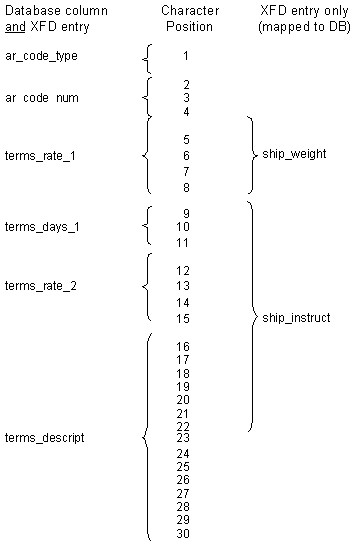
The diagram below shows how AcuODBC identifies database columns for some of the fields in the COBOL record, while other fields are mapped to those columns by the data dictionary; this means that all the fields are accessible to the COBOL program.