


To create a data dictionary, you specify the "-Fx" or "-Fxa"option at compile time. When you specify the "-Fx" option, an XFD file is created for every indexed file contained in the compiled program. When you specify the "-Fxa" option (ACUCOBOL-GT Version 4.1 or later), an XFD file is created for every indexed and relative file contained in the compiled program.
Once you compile with one of these options, each COBOL file will have a corresponding XFD file. The "-Fx" and "-Fxa" options create XFD files without changing anything in the object code, thus XFDs are fully portable, meaning no recompilation is necessary if you change data sources or hardware.
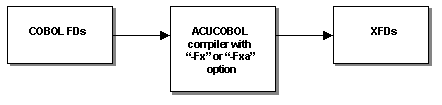
Creating XFD files at compile time offers two significant advantages:
The XFD files contain information about the structure of the COBOL files, the names of the fields, their format, and so on. However, this information is only a subset of the information available in most Windows applications. To map the rest of your application fields to COBOL data, you must add additional information to your data dictionary. To add information to your XFDs, or to change the default names of the existing fields, you must use directives, or optional comments, in your FDs. These directives are explained in Section 7.3, Using Directives.
More:
7.2.1 How the Data Dictionary is Formed
7.2.2 Defaults Used in XFD Files