


The server access file contains one or more access records. Each access record is composed of five fields:
Client Machine Name: The name of the client system
Client Username: The user's login name on the client system (on Windows NT (Intel), Windows 95, Windows, and DOS clients, Client Username is the value of the environment variable USERNAME. If that variable is not defined, the value of the variable USER is applied. The values assigned to these variables are case-sensitive. Be sure that the case used in the AcuAccess file matches the case of the value set in the variable. The literal string "USER" is applied when USER is not defined.)
Local Username: The local user name that AcuServer will use when fulfilling requests for the client user
Password: Optional password protection. When used, the requester must supply a password that matches this field.
Umask: A three-digit file creation mask. The umask is used when AcuServer creates a new file for the requester. The default value is 002.
A typical server access record might look like:
Client Machine Name  Client Username  Local Username  Password  Umask


starling             bernie           bsmith          <none>    002
This record will allow user bernie to connect from machine starling. AcuServer will use the local user name bsmith (Bernie's account on the file server) when executing requests for bernie. No password is required. Any files created for bernie will be created with a umask of 002 (read and write permissions for owner and group; read only permissions for others).
Three fields, Client Machine Name, Client Username, and Local Username, each have a wild card value that is used to indicate a general behavior. These wild cards are:
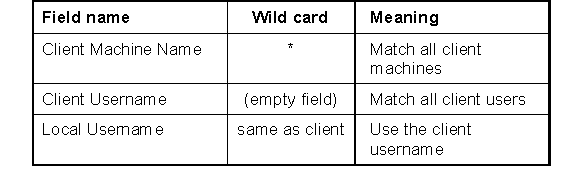
When the string "same as client" is specified in the Local Username field, if the Client Username is not a valid name on the server, DEFAULT-USER is used. In addition, if the Local Username field is blank, DEFAULT-USER is used.
On Windows NT (Intel), Windows 95, Windows, and DOS client systems, Client Username is set to the name given by the user at logon. If the operating system does not provide a logon, or the user bypasses the logon, the value of the environment variable USER is applied. If USER is not defined the value of the environment variable USERNAME is applied. Note that the values assigned to these variables are case-sensitive. Be sure that the case used in the AcuAccess file matches the case of the value set in the variable. If neither USER nor USERNAME is defined, the literal string "USER" is used.
For illustrative purposes, here is a set of common access records:
Client Machine Name  Client Username  Local Username   Password   Umask


support-pc                            techie           <none>     002

warehouse-pc                                           <none>     002

president-pc         diamond          <same as client> <none>     002

robin                                 <same as client> <none>     002

starling             felice           <same as client> <none>     002

starling             baxter                            ......     002

swallow              hartley          hartley          <none>     002

swallow                               acct             <none>     002
These entries are interpreted as follows:
The entry for support-pc allows any user of support-pc to use AcuServer. AcuServer will use the local user name techie when executing requests for support-pc.
The entry for warehouse-pc allows any user of warehouse-pc to use AcuServer. Because the Local Username field is empty, AcuServer will use the value of DEFAULT-USER as the local user name when executing requests for warehouse-pc.
The entry for president-pc allows user diamond to access AcuServer. For this record to match, the DOS environment variable USERNAME or USER must be defined with the value "diamond". AcuServer will also attempt to use diamond as the Local Username. If diamond is not a valid local user name, the value of DEFAULT-USER will be used.
The entry for robin allows all users of robin to access AcuServer. If the requester has an account on the server by the same name, AcuServer will use that name; otherwise AcuServer will use the value of DEFAULT-USER.
The first entry for starling allows user felice to access AcuServer. AcuServer will follow the same rules as the previous entry to assign a local user name.
The second entry for starling allows user baxter to access AcuServer. AcuServer will use the value of DEFAULT-USER when executing requests for baxter. baxter will need to provide a password before a connection will be established.
The first entry for swallow allows user hartley to access AcuServer. AcuServer will use the local user name hartley when executing requests for hartley.
The second entry for swallow allows all users of swallow to access AcuServer. AcuServer will use the local user name acct for all users of swallow, except hartley (or other records for swallow that explicitly name a client user).
The most permissive access record that can be created is:
Client Machine Name  Client Username  Local Username   Password  Umask


*                                     <same as client> <none>    002
This record allows any user of any client to use AcuServer, so long as they have an account on the server by the same name, or DEFAULT-USER is defined with a valid user name (DEFAULT-USER cannot be defined to be root). A client user running as root will be mapped to DEFAULT-USER.