


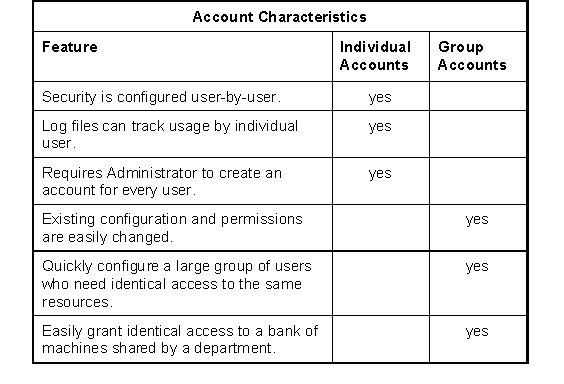
As you configure AcuServer, you need to establish user accounts on the Windows NT (Intel) host system. Determine whether each user will have a unique account, or whether groups of users will share an account (such as "Accounting") on the server. Here are some tradeoffs to help you make that decision.
NOTE: Members of a group can be logged on simultaneously with the same account.
If you choose group accounts on the server, users may still have individual accounts on their client machines. The username returned by ACCEPT FROM SYSTEM-INFO will be the local (client) login-ID.
Windows NT permissions
Windows NT controls access to resources with Access Control Lists (ACLs). An ACL specifically grants access to a user or to a group. Privileges are additive. The user has the highest access given to his or her account and to any groups to which that user belongs. The exception is "No Access," which overrides any other privileges.
Permissions are set by the account that owns the file. To override permissions, a non-owner must have the "Take Ownership" privilege and must use it to take ownership of the file before setting permissions.
The group "Everyone" contains every account on the system. Using this group is a handy way to set privileges, but can be a risky way to deny them. If a file or directory has "No Access" for Everyone, it will be unusable until someone (such as the Administrator) takes ownership and resets the privileges.
If you experience a problem with file access, it can be helpful to give the users Full Control of the files and directories they need to use. After everything is working smoothly, reduce access to Read-Only if desired. However, be sure to test each program to make sure that everything continues to function as you expect with the reduced privileges.