


AcuServer provides remote file access services to ACUCOBOL-85 and ACUCOBOL-GT applications that are running on UNIX, Windows NT (Intel), Windows 95, Windows, and DOS TCP/IP based networks. The application must be executed with a client-enabled Acucobol runtime.
AcuServer is compatible with ACUCOBOL-85 Version 2.4 and later, and with all versions of ACUCOBOL-GT.
With AcuServer, your applications gain:
 the ability to create and store data files on any UNIX or Windows NT (Intel) server equipped with AcuServer
full function remote access from UNIX, Windows NT (Intel), Windows 95, Windows, and DOS clients to all Vision, relative, sequential and object files stored on an AcuServer server
full record locking support of all Vision and relative files
transparent access of remote and local files
AcuServer does not require any changes to your existing application code (some applications that contain hard coded paths to files must be modified to use the FILE-PREFIX or CODE-PREFIX environment variable, or to include the name of the file server in the path. A discussion of name strategies is included in section 9.1).
AcuServer does not require that you recompile your existing programs. Programs compiled with any version of ACUCOBOL-85 or ACUCOBOL-GT can be executed with any client-enabled runtime. Client-enabled runtimes are available for most UNIX, Windows NT (Intel), Windows 95, Windows, and DOS platforms. Contact your Acucorp customer service representative for a current list of supported platforms.
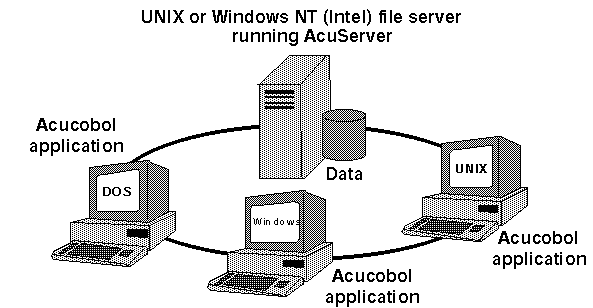
Above is an illustration of a simple AcuServer network. Acucobol applications running on UNIX and PC client systems access and store data files on a common UNIX or Windows NT (Intel) file server running AcuServer. More complex networks might incorporate multiple AcuServer file servers supporting dozens of client machines running multiple applications.