7.2.1 How the Data Dictionary is Formed
Acucorp data dictionaries (XFDs) enable the AcuODBC interface to convert COBOL records in the indexed or relative file system to "rows" and "columns" of data that can be accessed by common SQL commands. The rows and columns of data make up a "table" in a what can be considered a "virtual" database.
In the database table, each column contains the values for one field. The column names are essentially the field names. The table that is built is based on the largest record in the COBOL file, and contains the fields from that record, plus any key fields (key fields are those which are named in KEY IS phrases of SELECT verbs in the FILE CONTROL section). This ensures that data from all COBOL records will fit within the table, and simplifies the storage and retrieval process. If you were to examine the database columns, only the fields from the largest record, and the key fields, would appear.
With multiple record formats (level 01), not all COBOL fields are represented in the database by name, but all fields are storable and retrievable. The data dictionary maps fields from all records of a file to the corresponding locations in the "master" (largest) record of the file, and thus to the "virtual" database table. Only the fields included in the XFD will be available to any ODBC applications. Since AcuODBC has access to the data dictionary, it "knows" where the data from a given COBOL record fits in the database tables. This activity is invisible to the COBOL application.
For example, if your program has one file with the three records shown on the next page, the underlined fields will be included in the database table by default (this example assumes that ar-codes-key is named in a KEY IS phrase). Some fields will not appear in the table, but the data dictionary will map them to the "master" field names. The interface thus will eliminate redundancies and give you optimum performance.
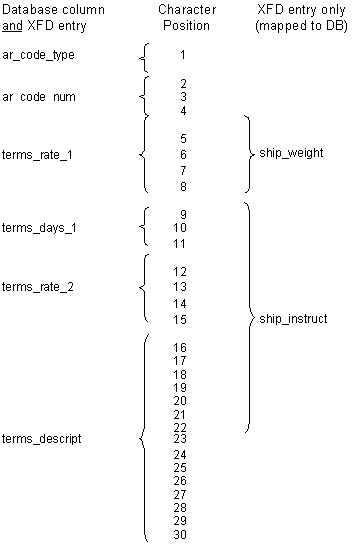
01 ar-codes-record.The diagram below shows how AcuODBC identifies database columns for some of the fields in the COBOL record, while other fields are mapped to those columns by the data dictionary; this means that all the fields are accessible to the COBOL program.03 ar-codes-key.
05 ar-code-type pic x.
05 ar-code-num pic 999.
01 ship-code-record.
03 filler pic x(4).
03 ship-weight pic s999v9.
03 ship-instruct pic x(15).
01 terms-code-record.
03 filler pic x(4).
03 terms-rate-1 pic s9v999.
03 terms-days-1 pic 9(3).
03 terms-rate-2 pic s9v999.
03 terms-descript pic x(15).