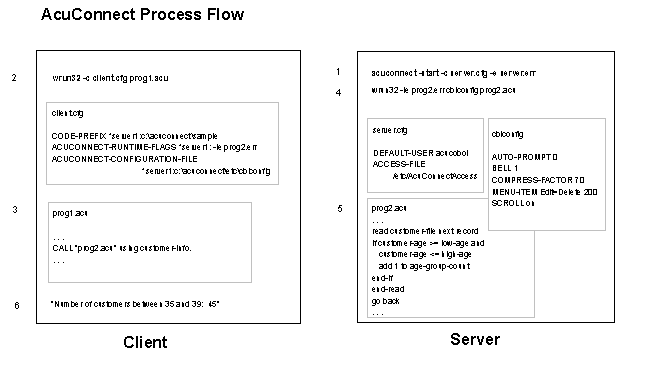
The AcuConnect process can be described as follows:
1. A network administrator starts the AcuConnect daemon on the server. In Windows NT, this can be accomplished through an application service. In UNIX, the administrator uses the acuconnect command along with options. For instance, he or she may type:
acuconnect -start -c server.cfg -e server.err
2. The user starts the ACUCOBOL-GT client application on the client. In Windows 3.x, Windows 95, or Windows 98, he or she clicks an icon. In UNIX, he or she types a runcbl command. For instance:
runcbl -c client.cfg prog1.acu.
3. The client application, "prog1.acu" in this example, performs a remote CALL to the server application. For instance:
CALL "prog2.acu" using customer-info.
4. AcuConnect automatically starts the remote application, "prog2.acu", on the server using the runtime flags and configuration file specified in "client.cfg".
5. The remote application performs the requested task and returns a response to the client.
6. The client program processes the result, possibly displaying it to the user.
This process is illustrated in the following diagram.